Showing posts with label other tips. Show all posts

Complete Messaging, VoIP, IM Solution with VoxOx

VoxOx is an entirely new way to take complete control of your interconnected lifestyle. Never miss a call. Never miss a text, IM, e-mail or fax. Make a conference call or video chat with the click of a mouse. Call anywhere in the world for pennies…or even better, for free!” That’s the services opening statement, and via my experience with it, I can attest to the fact that it’s all true.
It is becoming very close to being an all-in-one messaging client. Earlier today it made a public beta version of it service available to the public. While it only available for Windows and Intel based Macs, support for Linux and mobile coming soon.

VoxOx covers it all: phone calls, video conferencing, multi-IM, text, social networking, email and file sharing.
Features
  • VoxOx phone service allows you to call anywhere in the world literally for pennies, and in some cases for free. Paid calls are made by purchasing phone credits., and for the time being new members get 2 hours free time. As a bonus, if you refer people, and they elect to sign up, you’ll get an additional 2 hours for each person, with a cap of 20 hours total. All calls made with VoxOx can be encrypted using the AES 128-bits encryption.
  • Video conferencing can only be be started and shared with other VoxOx members, but on a brighter note, support for non VoxOx clients will be coming soon.
  • Voxox user will get their own free US number, which can used to forward the calls to home, office, or mobile.
  • File of up to 100MB can be shared via IM or email using a downloadable link.
  • Voice mail and Fax will be sent to the email you indicate during the set up of your account.
  • Send and receive text messages from your computer.
  • VoxOx supports almost all of the more popular IM’s (i.e., Yahoo, AOL, GTalk, MSN, ICQ, and Jabber.
  • Support for popular email accounts, allows you to send and recieve email messages from chat like interface.
  • Social networking accounts can be added to get all your contacts in one place and allows you to update social network profiles.
VoxOx Wizard
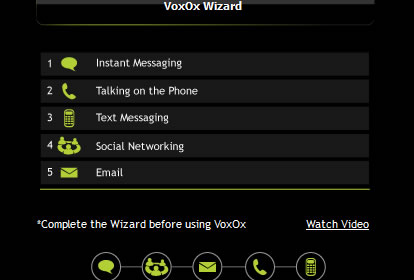
After downloading and installing the app, you’ll need to setup your account. On the first login it will supply you with a wizard to help you with your IM, Email, phone number, social networks, and so on. Once this step is complete you can begin using the service.
Download VoxOx Beta 1.0.0

Running A Board forum From Your Own Pc

Running A Board forum From Your Own Pc

If you wish to install php and mysql to run a phpBB installation on your computer, first you will need installers. Most of you have windows, so I recommend FoxServ. This is a great program that installs php, mysql, and more on your windows machine in under a minute, excluding download time.

Download foxserv 3.0 from http://www.foxserv.net/

Run the foxserv install program, it is pretty self explanatory, just do what it says.

After you get everything installed, run the foxserv control panel and click the install buttons for everything.

Open winmysql ADMIN. Create a new username and pass at start-up, and then create a new database, the one you will be using for your phpBB installation.

Now download phpBB 2.0.x from phpbb.com, or download phpBBplus from http://www.phpbb2.de/phpbb2plus/phpBB2_plus_1.2.zip.

Unzip the phpBB2 folder into C:\Foxserv\www\

After you have done such, visit http://localhost/phpBB2/ to view your install page. enter the correct information.
database name: the name of the database you created.
database username: username you created
database password: password you created

then enter your email information and everything else as it should be. Now delete the install and contrib directories from the phpBB2 folder on your computer.

Voila! All set up. If you want to have other people view your site, then you need a forwarding service. I have a dynamic IP, so I use http://www.dynu.com. Register an account there and follow all of their instructions if you have a dynamic IP. Now you should visit http://yoursite.dynu.com/ to make sure everything worked.

Also, windows xp users BE SURE TO INSTALL SERVICE PACK 1. SP1 fixes critical incompatibility issues with the apache 2.x server that prevents it from using php correctly. If you do not have service pack one, php pages will load incorrectly or not at all on your webserver.

I posted this because I was fed up with trying to find a host that supports php and mysql and doesnt have any ads on it.

NOTE: You wont get any HOST that will allows you WAREZ, then you can use your own pc as your own HOST

another program that works well is phpdev5 i have used it for a long time. and another site to register a dns name is http://dyndns.org it gives you better names, for example mine is http://shag.kicks-*ss.net.

making a .cue file in notepad

open up notepad n type (or copy n paste) this:


FILE "NAME.BIN" BINARY
TRACK 01 MODE1/2352
INDEX 01 00:00:00

change the word NAME.BIN inside the quotation marks to whatever the name of your BIN file is.......

when you go to 'save as'

in the 'files of type' ..click on the arrow n change from text document (*.txt) to 'all files'

n name it the same as the bin file

for instance..if the bin file is anything.bin

save your cue file as anything.cue

after ya save it copy n paste the file ta the folder with your bin file

Trojan Part 1


1.What is this text about?
/=-=-=-=-=-=-=-=-=-=-=-=-=-=/
In this text I'm going to explain you interesting things about
the trojans and about their future.I hope you'll realize that
trojans are dangerous and they're still big security problem although
many people say don't download files from the net and you won't get
infected which is not right.The main thing I want to explain here is
do the trojans have future and other interesting things about them.
This text is only for Windows based trojans not Unix one.
=-=-=-=-=-=-=-=-=-=-=-=-=-=

2.What Is A Trojan Horse?
/=-=-=-=-=-=-=-=-=-=-=-=-=/

A trojan horse is
-An unauthorized program contained within a legitimate program. This unauthorized
program performs functions unknown (and probably unwanted) by the user.

-A legitimate program that has been altered by the placement of
unauthorized code within it; this code performs functions unknown
(and probably unwanted) by the user.

-Any program that appears to perform a desirable and necessary
function but that (because of unauthorized code
within it that is unknown to the user) performs functions unknown
(and probably unwanted) by the user.

Trojans can also be called RAT's, or Remote Administration Tools.
The trojan got it's name from the old mythical story about how the greeks during
the war, gave their enemy a huge wooden horse as a gift.
They accepted this gift and they brought into their kingdom,
and during the night, greek soldiers crept out of the horse and attacked the city,
completely overcoming it.

3.Trojans Today
/=-=-=-=-=-=-=-=/
Trojans has always been big security problem even today.Most of the people
don't know what a trojan is and they keep downloading files from untrusted
sources or from suspicious people.Today there are more than 600 trojans on
the net that I know but I think there are many many more.Because every hacker or
programer today have it's own trojan made for his/her special needs and not
published anywhere.Every hacking group has also it's own trojans and programs.
When someone start learning winsock the first creating is chat client or trojan
horse.Even the anti-virus scanners I'll talk below people still get infected
by themselves,by some hacker or by some of your friends.
----------------------->

4.The Future Of Trojans
=-=-=-=-=-=-=-=-=-=-=-=-=
I think there're a lot of people out there that think the
trojans are outdated and they don't have future.Well I don't
think so.Trojans will always have future and new things added in
them.There are so many things that can be improved by skilled programers
in the trojans.
Trojans that COMPLETELY hide in the system and of course restart every time Windows is loaded
trojans that will lie every trojan and anti-virus program this is the future I think.
People that program trojans has a lot of ideas that makes their trojans unique.
These people start placing backdoors in ActiveX and who knows maybe in future they'll
find other sources they can place the trojans in.Programmers will always think of
new and unique trojans with functions never seen before.
Trojans are made every day by the programers with new options and with better encryption so
the Anti-Trojan software can't detect them.So noone knows how many are the trojans on the net.
But the programmers are still programming trojans and they will continue in the future.
Technically, a trojan could appear almost anywhere, on any operating system or platform.
However, with the exception of the inside job mentioned previously, the spread of trojans works
very much like the spread of viruses. Software downloaded from the Internet, especially shareware or freeware,
is always suspect. Similarly, materials downloaded from underground servers
or Usenet newsgroups are also candidates.There are thousand of programs with not checked
source and new programs are appearing every day especially the freeware one so they can all be
trojans.So be careful what you're downloading and from where you're downloading it.
Always download software from the official page.
----------------------------->

5.Anti-Virus Scanners
/=-=-=-=-=-=-=-=-=-=-=-=/
People think that when they have a virus scanner with the latest virus definitions
they're secure on the net and they can't get infected with a trojan or noone can
have access to their computer.This is NOT right.The purpose of the anti-virus
scanners is to detect not trojans but viruses.But when trojans became popular
the scanners started adding also trojan definitions.These scanners just can't
find the trojans and analyze them that's why they're just detecting the common
and the well know from everyone trojans like Back Orifice and NetBus and also
several other.As I told they're around 600 trojans I know out there and the
anti-virus scanners are detecting just a LITTLE part of them.
These scanners are not firewalls that will stop someone that want to connect
to your computer or try to attack you as people think they are.So I hope that
you understand that the main purpose of these scanners is not to detect
trojans and protect you while you're online.
Most of the internet users know only Back Orifice and NetBus as trojans.
There are some specific tools out there that clean ONLY from these trojans.
Again people think that they're secure and protected from every trojan.
--------------------------->

6.How Can I get Infected?
/=-=-=-=-=-=-=-=-=-=-=-=-=-=/
Everyone ask this question and often people ask themselves how they got
infected.Also when someone ask them did they run some file send to them
by someone or downloaded from somewhere people always say they didn't
run anything or download some file but they did it.People just don't
pay attention to things they do online and that's why they forget
about the moment of the infection with the trojan.
You can get infected from many places and I'll try to explain
you these things here.

6.1 From ICQ
6.2 From IRC
6.3 From Attachment
6.4 Physical Access
6.5 Tricks-diskette

6.1 From ICQ

People think that they can't infect while they're talking via ICQ
but they just forget the moment when someone sends them a file.
Everyone knows how insecure ICQ is and that's why some people
are afraid of using it.

As you maybe know there's a bug in ICQ allowing you to send a .exe
file to someone but it will look as .bmp or .jpg or whatever you want
it to look like.This is very dangerous as you see and can get you in
trouble.The attacker will just change the icon of the file like
a BMP image,tell you it's a pic of him,rename it to photo.bmp
then you'll get it and of course before getting it you'll see that
it's .bmp and you're secure because the file is not executable.
Then you run it see the picture and you think there's nothing to
worry about but there is.

That's why most of the people say that they didn't run any files
because they know that they've run an image not executable.
A way to prevent this bug in ICQ is always to check the type of
the file before running it.It may has an BMP icon but if at the type
of the file is written executable I thin you know that it will be
mistake if you run that file.

6.2 From IRC

You can also get infected from IRC by receiving files from
untrusted sources.But I advice you always to be paranoid
and do not receive files from ANYONE even from your best
friend because someone may stolen his/her password
and infect you.Some people think that they can be 100% sure
that the other person is their friend when they ask him/her
something like a secret or something else that only he/she know
but as I told you be paranoid because someone may infect your friend
and just check his/her IRC logs and see what is this secret about or
learn other things.Be paranoid it's more secure as I say and do not
receive files from anyone on IRC or from somewhere else like
e-mail,ICQ or even your online friends.

6.3 From Attachment

The same thing goes about the e-mail attachments.NEVER run anything
even if it says you'll see hot porno or some passwords for server or
anything else.The best way to infect someone with a trojan is mass
e-mailing the server because there're new people on the net and
they'll of course get infected.This is the best way of infecting
as I said that's why it's preferred by the people that want to infect
the masses.

6.4 Physical Access

You can of course get infected by some of your "friends" when they
have physical access to your computer.Let's suppose you leave
someone on your computer just for 5 minutes,then of course you can
get infected by one of your "friends".There are some very smart people
out there that keep thinking of new ways of getting physical access
to someone's computer.Here are some tricks that are interesting:

1.You "friend" may ask you "Hey bro can you give me some water"
or something that will leave him alone.You'll go to take some
water and then........You know

2.The attacker may have a plan.Let's say you invited him/her
at 12:00 at your home and that attacker told one of your
"friends" to call the victim at 12:15 and start talking
about something with the victim.The attacker again have time
to infect you.
Also the "friend" that is calling you may say something like
"Is there anyone around you,if so move somewhere
else I don't want anyone to hear what we are talking about"
The attacker is again alone and have time to infect you.

6.5 Trick

This is one trick that may work on people that really
want something and the attacker knows what is it.
Let's say that the victim wants to watch some porno
or want xxx passwords,then attacker can just leave
a diskette with the trojan in the front of the victim's
house and put the trojan with some xxx pics of course.

This is bad things because sometimes if you really want
something and you finally found it you don't think about
anything else except to check it you.You again get infected.

I hope now you understand how you got infected the last time
(if you got infected of course).
----------------------------------->

7.How dangerous a trojan can be?
/=-=-=-=-=-=-=-=-=-=-=-=-=-=-=-=-=/

Many people that don't know what a trojan is
think that when they run an executable nothing
happened because their computer is still working
and all the data is there,if it was a virus
their data will be damaged and their computer will
stop working.

Someone is downloading and uploading files on your
computer.
Someone is reading all of your IRC logs and learning
interesting things about you and your friends.
Someone is reading ALL of your ICQ messages.
Someone is deleting files on your computer.

These are some examples how dangerous a trojan can be.
There people that use trojans just to place virus
on the infected machine like CIH and destroy the machine.
--------------------------->

8.Different Kinds Of Trojans
=-=-=-=-=-=-=-=-=-=-=-=-=-=-=
Remote Access Trojans
-------------------------------

These trojans are the most popular trojans now.
Everyone wants to have such trojan because he
or she want to have access to their victim's hard drive.
The RAT'S (remote access trojans)are very
simple to use.Just make someone run the server
and you get the victim's IP and you have FULL
access to his or her computer.They you can
almost everything it depends of the trojan you use.
But the RAT'S have the common remote access trojan functions like:
keylogger,upload and download function,
make a screen shot and so on.Some people use the
trojans for malicious purposes.
They want just to delete and delete.This is lame.But a have a guide
about the best way to use a trojan.You should read it.
There are many programs out there
that detects the most common trojans,but new trojans are
coming every day and these programs are not the maximum defense.
The trojans do always the same things.
If the trojan restart every time Windows is loaded that
means it put something in the registry
or in win.ini or in other system file so the trojan can restart.
Also the trojans create some file in
the WINDOWS\SYSTEM directory.The file is always looking
to be something that the victim will think
is a normal WINDOWS executable.Most trojans hide
from the Alt+Ctrl+Del menu.This is not
good because there are people who use only this way to see
which process are running.There are programs
that will tell me you exactly the process and the
file from where it comes.Yeah but some trojans
as I told you use fake names and it's a little hard
for some people to understand which process
should they kill.The remote access trojans opens
a port on your computer letting everyone to connect.
Some trojans has options like change the port
and put a password so only the guy that infect you
will be able to use the computer.The change
port option is very good because I'm sure you
don't want your victim to see that port 31337 is open
on their computer.Remote access trojans are
appearing every day and they will continue to appear.
For those that use such trojans: BE CAREFUL
you can infect yourself and they the victim you
wanted to destroy will revenge and you'll be sorry.
---------------------------------------
Password Sending Trojans

The purpose of these trojans is to rip all cached
passwords and send them to specified e-mail
without letting the victim about the e-mail.
Most of these trojans don't restart every time Windows
is loaded and most of them use port 25 to
send the e-mail.There are such trojans that e-mail
other information too like ICQ number
computer info and so on.These trojans are dangerous if
you have any passwords cached anywhere on your computer.
----------------------------------------
Keyloggers

These trojans are very simple.The only one thing
they do is to log the keys that the victim is pressing
and then check for passwords in the log file.
In the most cases these trojans restart every
time Windows is loaded.They have options
like online and offline recording.In the online recording
they know that the victim is online and
they record everything.But in the offline recording
everything written after Windows start is
recorded and saved on the victims disk waiting for
to be transferred.
----------------------------------------
Destructive

The only one function of these trojans is to
destroy and delete files.This makes them very simple
and easy to use.They can automatically
delete all your .dll or .ini or .exe files on your computer.
These are very dangerous trojans and once
you're infected be sure if you don't disinfect your
computer information will no longer exist.
-----------------------------------------
FTP trojans

These trojans open port 21 on your computer
letting EVERYONE that has a FTP client to connect
to your computer without password and will full upload and download options.


These are the most common trojans.They all are dangerous
and you should me careful using them.
-------------------------------------->

9.Who Can Infect You?
/=-=-=-=-=-=-=-=-=-=-=/

Well basically you can get infected by everyone that know how
to use a trojan(it's VERY easy) and of course know how to infect you.
People that use trojans are wannabe hackers that are just at the stage
of using trojans.Some of these people don't move to the next stage
and they're lamers that can only use trojans and as I said it's VERY easy.
But after reading this text you'll know the most common ways that someone
can infect you with a trojan and it will be hard for the people using them
to infect you.
------------------------>

10.What Is The Attacker Looking For?
/=-=-=-=-=-=-=-=-=-=-=-=-=-=-=-=-=-=-=/

Some of you may think that trojans are used for damage only.
Well they can also be used to spy on someone's machine and
take a lot of private information from it.Wellthe common data an attacker looks
for would include but not limit to the following.

-----> Credit Card Information
-----> Credit Information
-----> Checking Account Information
-----> Any accounting data
-----> Data bases
-----> Mailing Lists
-----> Personal Addresses
-----> Email Addresses
-----> Account Passwords
-----> Home Office / Small Business Information
-----> Company Accounts / Subscribed for Services
-----> Resumes
-----> Email
-----> Any Company Information / Services He Can Access
-----> Your or spouse's first and last name
-----> Children's names / ages
-----> Your address
-----> Your telephone number
-----> Letters you write to people
-----> Email
-----> Your personal resume
-----> Your family pictures
-----> School work
-----> Any school accounts / information

Recover Dead Hard Drive Data

Legend has it that if you put a dead hard drive in a freezer, pull it out and plug it in, it should run long enough to recover the data. Is it true? Indeed, it seems so.

While freezing the drive for a while extends life momentarily, the real trick is to run the hard drive while it’s in the freezer. Just throw in a water tight bag first, of course. Works pretty well with other gadgets including iPod hard drives too.

Evidence:

Note, this only temporarily extends the life of the device, allowing you to recover data before it completely dies.

New PC or New Motherboard?

If you don't want to spend big bucks on a new PC, consider upgrading your old system's motherboard and CPU. This can boost the machine's performance and give you access to the latest technologies. It can also save you hundreds of dollars.

What you won't get is a new hard drive, optical drive, or operating system, though the new motherboard gives you the option of upgrading these components later. When you do it yourself, you choose the make, model, and cost that serve you best, rather than settling for what's preloaded in an off-the-shelf machine.

For as little as $200 to $350, you can purchase a motherboard with a new Pentium 4 or Athlon processor and 512MB of RAM. (Visit this link to check the latest motherboard prices.) That's hundreds of dollars less than the retail cost of a midrange PC that supports AGP 8X graphics cards, Serial ATA drives, and the other advanced features that your new motherboard is likely to offer.


Motherboard Buyers Guide

Size matters: Most desktop PCs sold in the last few years conform to the ATX form factor (as do most motherboards), but not all do. Many small or ultrabudget systems are based on other designs, and some PCs from HP/Compaq, IBM, and other big-name vendors aren't ATX-compatible. Refer to your computer's documentation to see if the new motherboard will fit inside its case.

Find the right CPU: The optimal combination of CPU price and performance may lead you to early versions of Athlon XP and Pentium 4 processors: Retail boxed versions of 1- to 2-GHz AMD Athlon XP processors cost less than $100, while Pentium 4 processors running at comparable speeds are less than $130. OEM versions of both (that's minus the fancy box, the cooling fan, and sometimes a warranty) may be priced considerably lower. Avoid older Pentium 4 processors with 256KB of L2 cache. CPUs with 512KB cache are faster and well worth the small added expense.

Be picky: Steer clear of no-name vendors and buy from established manufacturers only.

Pay for power: Your old PC's power supply may not have enough wattage or may lack the 12-volt amperage needed to run some Pentium 4 and Athlon motherboards. Check the new motherboard's requirements against the specs on your power supply. If in doubt, buy a power supply that generates 300 watts or more,

Faster is better: A motherboard's frontside bus speed is the rate at which data moves between the CPU and RAM. FSB speed can have a greater effect on overall system performance than listed CPU speed, which is a multiple of the FSB speed. The faster the FSB, the better.

Get it all: Your new motherboard needs PCI slots and USB ports, two UltraATA/100 connectors, parallel and serial ports (if you use these), and at least two DIMM slots for RAM (DDR RAM is best). For a little extra money, you can get Serial ATA, ethernet, RAID, FireWire, Wi-Fi, and other advanced features.

Sight and sound off: Some low-cost motherboards have sound and graphics functions built in. The quality of these integrated functions is often marginal. Make sure that any built-in sound and graphics can be disabled, and that separate audio and graphics boards can be added.

Minimize Your Mousing

For people in a hurry, every unnecessary mouse movement is an aggravation. Windows 2000, Me,XP,Vista and 7 let you set the pointer to automatically move to commonly used buttons in dialog boxes. Click Start, Settings, Control Panel (or Start, Control Panel in XP), and click or double-click Mouse (choose "Printers and Other Hardware" first if you're in XP's Categories view, or "View all Control Panel options" if you're in Me's "commonly used" view). Now select Pointer Options, check the box labeled "Automatically move pointer to the default button in a dialog box" (the option's wording varies slightly in Windows 2000), and click OK.

Sim Card Data Recovery Software


Sim Card Data Recovery Software recovers your mobile phone sim card accidentally deleted text SMS messages.
Data Doctor Sim Card Recovery Software is read only and non-destructive utility restore all lost message.
Utility retrieve all deleted contact numbers (phone numbers), unreadable messages, corrupt phone book directory.
It provides full backup of your cell phone’s erased sim memory.
For recovery, you need a phoenix type USB sim card reader or PC/SC Standards based sim card Reader and a PC
having Microsoft windows operating system. Sim card reader scans simcard deeply and detects all the recoverable
information. Print option provides the facility to print report of all recovered data like your text message and
contact numbers. This software provides full details about sim card like its provider and ICC –ID (identification
number).
It provides restoration of lost or corrupted text files due to virus infection in your mobile phone. Recovery is
not possible if sim card is locked (due to unauthorized PIN code). Software ensures recovery even if your inbox,
outbox, draft and sent items messages and phone numbers are invisible or unreadable. It fetches recently erased
call list.
Features:
-Tool Support recovery on windows XP, 2003, XP Media Center2005, Longhorn, Vista, 2000, NT, ME and 98.
-It is Read only and Non- Destructive sim card data recovery utility.
-Print option provides recovered data on paper in text format.
-Software also shows the provider name and ICC identification number of sim card.
-Utility provides full backup of corrupt or damaged sim card memory.
Please remember that you need USB SIM Card reader (any PC/SC Standards or Phoenix Standards based Reader) to use
our software to recover data from sim card. If you are not able to find any compatible SIM card reader,
Please feel free to contact us to get the information of manufacturers, who can make it available to you
in very short time.
Operating system supported:
-Windows XP (Home, Professional and media center editions).
-Windows 2000 (Professional server and advanced server editions).
-Windows NT (Terminal, Server and Workstation editions).
-Windows server 2003.
-Windows 98.
-Windows VISTA.

Download :

rapidshare.com/files/146442009/SIM_Card_Data_Recovery_Software_

Open-E Releases Data Storage Server for VMware ESX 3.5

Open-E, announced general availability of Data Storage Server (DSS(TM)) for VMware ESX 3.5. VMware provides TAP program members with tools to develop products that are complementary to VMware virtualization software and help deliver high-value solutions to joint customers. Data Storage Server for VMware ESX 3.5 will provide mutual customers with enhanced capabilities for consolidating storage environments.

"DSS effectively leverages VMware virtualization to solve storage management challenges in virtualized server environments, enabling customers to consolidate storage resources," said Bernie Mills, senior director, alliances programs at VMware. "We are pleased that Open-E is helping to deliver added value to customers with innovative technology combined with the significant business benefits of VMware virtualization, including lower capital and operating expenses, business continuity, strengthened security and reduced energy consumption."

"This alliance with VMware validates DSS for consolidation of storage resources in a virtual infrastructure to support more comprehensive data protection," said Krzysztof Franek, CEO of Open-E. "Our combined solution allows datacenters to provision their storage easily and cost-effectively. It also provides for enhanced functionality with built-in data protection; virtualization; backup and recovery; and volume replication for disaster recovery -- all with any-to-any connectivity."

With more than 800 members worldwide, the VMware TAP program works with best-of-breed technology partners to provide them with a comprehensive set of VMware technical and marketing services, support, tools and expertise to deliver enhanced value to joint customers.

Recover data from a quick-erased CDRW/DVDRW disc

Procedure used to recover data from a quick-erased CD/DVD-RW disc

1. Make a file of exactly the size of the cd/dvdrw disc's capacity .
(this step may not be needed)

2. With Nero I created a new project and added the file to it so that I have the disc filled. I gues you can also fill up the disc with other files.
The reason why I fill the disc is because I want Nero to make a session that uses the entire disc. Like I wrote earlier in this thread I experienced that my CD/DVD-Drive refuses to read off the disc beyond the session's boundaries. When you quick-erase a disc there is no session anymore so the drive will not read at all. Burning a new session will overwrite the data and burning only a small session will NOT make the drive read the other data that is still on the disc.
The reason why I used the one big file is so that I could later on recognize which part of the disc was overwritten by this file because this file contained all zeros (0x00).

3. I pressed burn and selected disc-at-once. Then while Nero was burning the leadin I pressed cancel. My CD/DVD-Drive finished writing the lead-in and Nero reported an error.
This is what was accomplished however: Now the disc contains a session that says that the used disc size is the complete disc. Nero did not get to writing file because I cancelled it. Good thing because I don't want Nero to write any files because my old data will get overwritten!
I gues it works the same with different writing software. Another method that I used during a test was simply press the reset button of the computer when the burning software was done with writing the lead-in and started with the files.

4. I had to restart the computer after cancelling burning.
With the cdrw disc inserted I saw in "my computer" that windows recognized that the disc was 650MB, clicking on it gave an error. Good so far!

Now with IsoBuster you can extract the sectors from a disc to a file. This is what I did.
I gues that if you have data-recovery software at this point it will be usefull because now (if all went well;)) the CD/DVD-Drive WILL read data from the entire disc. Anyway, I used ISO-Buster because the files that I needed to recover where a bit odd for nowadays (.XM, .S3M, .MP3):
In IsoBuster I had to do several steps:

Step 1: Find out from and to which sector the drive will read
By choosing "Sector View" you can look at any given sector.
Here I found out what the first and the last sectors where that are readable. (Hint I used the method for the old game: "Gues a number below 100, I'll tell if it is higher or lower than what you gues")
Step 2: Extract the actual sectors
By choosing "Extract From-To" you can extract any given range of sectors to a file. My disc was a data-disc so I choose the first extraction type "User data, 2048 bytes/block...".

In the end I got a .tao file which was about 650MB. I ran several programs on it to look for files inside a file by searching for file-header-paterns:
1. Multi Ripper 2.80 (for DOS, for the .XM files. It does many other file formats as well (jpg,png, bmp,wav,etc,etc +100). Try google with this query: Multi Ripper 2.80. I still had the file from good old days but I saw several good search results)

2. Winamp for mp3.
Winamp will scan any file when you give it the extension .mp3 and play it as one big song (so I renamed the .tao file to .mp3). I used the discwriter to get a .wav and the Adobe Audition to manually cut and save my songs. I looked at the MP3 file format and it is hard to find an mp3 file in a big file because it has no clear header just a bunch of mpeg-frames in most cases for me . A lot of my files had no ID3v2 or ID3v1 tags... But after a couple of hours I recovered everything.

Finally a list of used stuff:

Software:
- IsoBuster v1.9 and above
- Nero 6.8 and above
- Multi Ripper 2.80 and above
- WinAmp v5.02 and above
- Windows XP Pro NL (patched up)

Hardware:
- NEC DVDRW ND1300A 1.06

Disc:
- some old 4 speed CDRW/DVDRW

Outstanding Uses for your Old USB Drives


With 8GB sticks coming out for less than $20, it’s no wonder why our old 128mb sticks have been stuffed away in drawers, never to me used again. Learn to resurrect your old USBs and make them into a physical “key” for your computer, portable OS, and more.

  1. Create a physical key for your computer, so it only boots when your USB is inserted.
  2. Turn them into portable NES, SNES, Game Boy, Genesis, and arcade emulators.
  3. Carry your own portable Linux operating systems.

For an entire list of how to reuse your old drives, see the full guide and our USB projects.

Googling the Right Way

Short History

Right, this will be a really, really short history lesson. If you're interested, check out what the people over there has written for yourself. (Link at page bottom)

So, Google was created by the duo Larry Page and Sergey Brin, two Stanford grad students who, although they didn't see eye-to-eye on many topics, were determined to crack the quite boring nut of organizing all that information that was spread out on the web. By 1997, their BackRub Search Engine had started gaining a sparkling reputation for its unique way of analyzing and ranking webpages through "back links", links pointing to a page from other pages. The system also gained attention for its interesting server environment, contrary to the "normal" high-end servers, BackRub ran on a collection of simpler PCs, collected from the campus' nooks and crannies.

From there, the story is one of unfathomable success ("Instead of discussing all the details, why don't I just write you a check?"), leading to the status of The One Search-engine we all know, love and envy.

PageRank

"Back links?" you think. Yeah, Google's system of deciding what pages are worth your reading-cycles differed from all other search engines' way at the time. The PageRank algorithm ranks all sites by giving them a rank between 0 and 10, based on how many other pages are linking to the site, and what value the linking pages has.
If you are interested in the mathematics between the PageRank algorithm, I suggest you read about it on Wikipedia. The logics behind PR is not in the scope of this article.

From this information, you can probably figure out the basics of SEO, Search Engine Optimization. Get your page linked to by the big boys. Of course, some people just can't be content with playing by the rules, and the PR-algorithm isn't perfect, so from time to time someone manages to fool the algorithm, an example being the 302 Google Jack, redirecting the new, zero-ranked page to a rank ten page, like Google itself. When Google updates the PageRanks, the new page will get the same rank as the page it linked to. Other people buys and sells high-valued links, really a kind of advertising, but with a big debate buzzing in the background. Google has requested that such links use the HTML attribute "nofollow", rendering the page linked to to be ignored when re-ranking.

The above mentioned kinds of tricks, as well as many others, can of course lead your page to get devalued, meaning that it will not be ranked at all. Play safe!

Basics

Every Joe Schmoe knows that search-engines like Google doesn't take kindly too long sentences and free-text, but he probably never bothered reading up on how the magical searchbox actually works, something he should be severely punished for. Let's leave Joe to his fate, and rise far above him, to the lands without stupid questions.
Even in the "basic" syntax collection I'm sure you are able to find a few sparkling gems you didn't know about, so skim through it even if you feel confident in your Google-Fu.

So, top down, a standalone word yields pages containing that word, a sentence enclosed with quotation-marks (" ") similarly yields pages that contain that exact phrase. If you have ever created an SQL-query for some database, I'm sure you will find a lot of similarities as we go on now. Google is actually "just a database", remember?

Command Example Result

AND [&] (ampersand) Slackware AND Linux Shows pages containing both arguments, *OBS* this is the default operator, no need to include
OR [|] (pipe) Laptop OR Desktop Shows pages containing either argument
- (minus) Hamburger -McDonalds Shows pages containing the word "Hamburger", but only if they don't mention "McDonalds"
+ (plus) +coke Contrary to the "includes" belief, this limits the results to the given form only, no pluralis or other tenses
~ (tilde) ~Hacker Results include everything deemed similar to "Hacker"
* (asterisk) Fish * Chips The wildcard (*) is replaced by one or more words/characters (and, n, 'n, &)
define: define:Nocturnal A personal favorite, looks up the meaning of the word
site: Phreaking site:phrack.org Limits the search to a specific site
#...# zeroday 2007...2008 Search results include a value within the given range
info: info:www.hacktivismo.com Shows information about the site
related: related:www.google.com Shows pages similar/related to argument
link: link:www.darkmindz.com Shows sites linking to the argument
filetype: phrack filetype:pdf Results are limited to given filetype
([?]) Cyber (China & America) Nestling combines several terms in the same query
[?A] in [?B] 1 dollar in yen Converts argument A to argument B
daterange: daterange:2452122-2452234 Results are within the specified daterange. Dates are calculated by the Julian calendar
movie: movie:Hackers Movie reviews, can also find movie theaters running the movie in U.S cities
music: music:"Weird Al" Hits relate to music
stock: stock: goog Returns stock information (NYSE, NASDAQ, AMEX)
time: time: Stockholm Shows the current time in requested city
safesearch: safesearch: teen Excludes pornography
allinanchor: allinanchor: Best webcomic ever" Results are called argument by others
inanchor: foo bar inanchor:jargon As above, but not for all. The corresponding below all bear the same meaning
allintext: allintext:8-bit music Argument exists in text
intext:
allintitle: allintitle: Portfolio Argument exists in title
intitle:
allinurl: allinurl:albino sheep Argument exists in URL
inurl:

Advanced
GET-variable breakdown
http://www.google.com/search?
as_q=test (query string)
&hl=en (language)
&num=10 (number of results [ 10,20,30,50,100 ])
&btnG=Google+Search
&as_epq= (complete phrase)
&as_oq= (at least one)
&as_eq= (excluding)
&lr= (language results. [ lang_countrycode ])
&as_ft=i (filetype include or exclude. [i,e])
&as_filetype= (filetype extension)
&as_qdr=all (date [ all,M3,m6,y ])
&as_nlo= (number range, low)
&as_nhi= (number range, high)
&as_occt=any (terms occur [ any,title,body,url,links ])
&as_dt=i (restrict by domain [ i,e ])
&as_sitesearch= (restrict by [ site ])
&as_rights= (usage rights [ cc_publicdomain, cc_attribute, cc_sharealike, cc_noncommercial, cc_nonderived ]
&safe=images (safesearch [ safe=on,images=off ])
&as_rq= (similar pages)
&as_lq= (pages that link)
&as_qdr= (get only recently updated pages d[ i ] | w[ i ] | y[ i ])
&gl=us (country)

Googledorks

So, Google gives us all those handy tools for filtering away what we don't want to see, how can we use this to help securing our own systems?

Well, for example, we could use the neat Google Hacking Database, a project where people has submitted a huge collection of queries yielding results that the unskilled webmaster (the Googledork) wishes weren't there. Everything from vulnerable login-forms to passwords surfaces with some cleverly engineered queries.

Goolag

Goolag is a vulnerability scanner (and a politically involved protest..) made by the famous Cult of the Dead Cow. It builds on the above mentioned GHDB, scanning for vulnerabilities in the database. At the moment there is only a Windows-version of the program. The Goolag project is also a campaign against Google's (and a few other big players') choise to comply with the Chinese censorship policy.

Useful Queries

-inurl:htm -inurl:html intitle:"index of" "Last modified" mp3 mp3-file indexes, add desired artist
site:rapidshare.de -filetype:zip OR rar daterange:2453402-2453412 Zip Files on rapidshare uploaded on specified date
http://www.google.com/search?q=your+query+here&as_qdr=d1 Query results updated within one day


Others

http://www.google.com/search?q=answer to life, the universe, and everything
http://www.churchofgoogle.org
http://www.google.com/technology/pigeonrank.html

References
http://www.google.com/help/cheatsheet.html
http://www.dumblittleman.com/2007/06/20-tips-for-more-efficient-google.html
http://www.googleguide.com/advanced_operators_reference.html
http://sudarmuthu.com/blog/2006/05/07/google-search-syntax-dissected.html
http://en.wikipedia.org/wiki/PageRank
http://googlesecretsandtips.blogspot.com

Further Read:

In Side Google Office/ Google's Intranet

What do around 16,000 Google employees stare at in the morning when they’ve arrived at the office? They might be looking at Moma, the name for the google intranet. The meaning of the name of “Moma” is a mystery even to some of the employees working on it, we heard, but Moma’s mission is prominently displayed on its footer: “Organize google’s information and make it accessible and useful to Googlers.” A “Googler,” as you may know, is what google employees call themselves (they have other nicknames for specific roles; a noogler is a new google employee, a gaygler is a gay one, a xoogler is an ex-one, and so on).


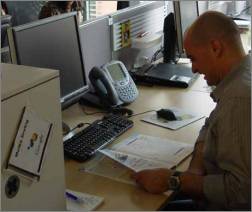
A Google employee in Hamburg (photo taken in mid-2007)

Moma “was designed by and for engineers and for the first couple of years, its home page was devoid of any aesthetic enhancements that didn’t serve to provide information essential to the operation of Google. It was dense and messy and full of numbers that were hard to parse for the uninitiated, but high in nutritional value for the data hungry.

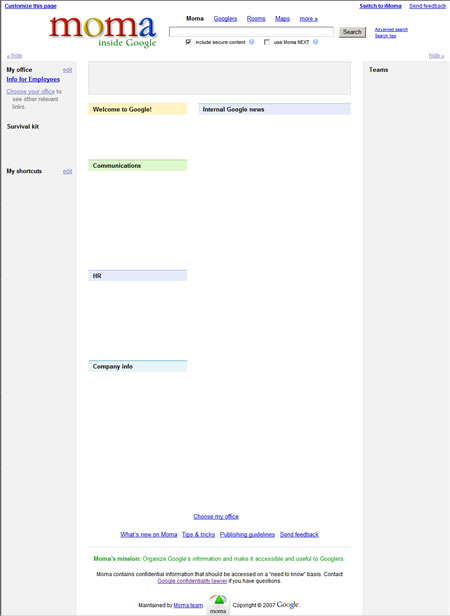
Here’s a picture of the Moma homepage that we got hold of – please note that large areas have been grayed out or whitened out:


On the top of the Google intranet homepage, you’ll find the logo reading “Moma - Inside Google.” Next to it is a search box allowing you to find information from Moma in general, information on specific Google employees, information on availability of meeting rooms, building maps and more. You can choose to include secure content or not via a checkbox. Another checkbox offers you to use “Moma NEXT" for a more experimental variant of search results.

To the top right, there’s an option to switch to iMoma, an iGoogle-style tool prepared by the company which allows further customization of the intranet start page. This way, employees may be able to select their own news and service widgets of interest to be displayed when they log-in.

The actual content of the homepage in the picture is split up into 4 columns. To the left, there’s a “My Office” section, with information for employees and a way to choose your own office for more relevant links. It’s followed by the sections “Survival Kit” and “My shortcuts.” In the middle columns, news gadgets are headlined “Welcome to Google!,” “Communications,” “HR” (human resources), “Company Info” and “Internal Google news,” all in common soft shades of Google base colors. The right column is listing Google teams.

Searching Moma


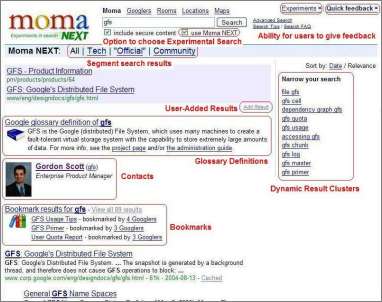
When you perform a search on Moma, you will see a result similar to the following; this screenshot, which was edited by Google to include comments, has been published by the Google Enterprise Blog in a post of theirs in July to show-case the kind of functionality available:


On the image, you will see a “universal search" style result including employee information, bookmark results, documents hosted on Google’s intranet, and a list of related queries. Users get to choose between ordering by date or by relevance. One can also limit the results to different segments like “Tech,” “Official,” or “Community.” Google in their blog said the use the Google search Appliance to power this service.

Ex-employee Doug Edwards mentioned how he came to take for granted everything was available on the intranet, “from the status of products in development to the number of employees at any point in the company’s history.” He adds that the transparency was also a motivator, as “Your failures are also visible to everyone in the company, which provides an even greater motivator to continuously improve performance in the areas for which you are responsible.” These days however, as Doug writes, Google “clamped down on who had access the complete state of the business.

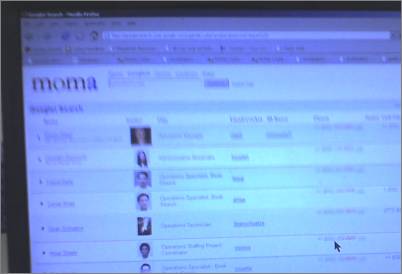
The following photo shows a result for what seems to be an employee search. The photo is used with permission from Zach at HannaCabana.com, though Zach tells me it had been anonymously submitted to him (note we added blurring to the phone numbers of the zoom version):


On the employee results page, everyone is listed with their name, a photo, their job title, telephone number and more. Clicking through to an employee lands you on their full profile page. Ex-Googler Doug Edwards remembers how many Google employees used “alternative images and titles" for their Moma listing. “I recall photos of samurai warriors and masked figures with titles like ’Shadow Ops’ and ’Black Ops.’ These were later weeded out as part of an upgrade”.

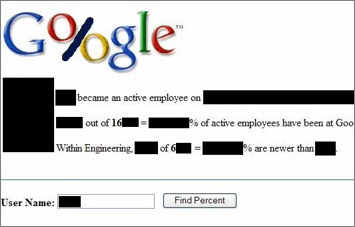
Employee data may also be rendered in different forms. Below is a screenshot we first posted on in February of an internal application called Google Percent:


This service simply shows how many employees are newer than a particular other employee (some areas in the image have been blackened out).


How employees access the intranet


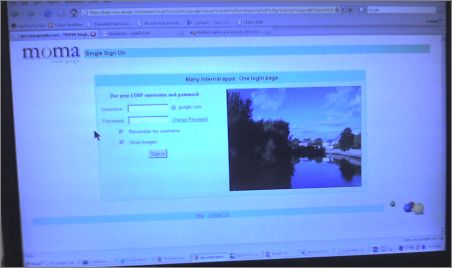
Photo courtesy of Zach, again.

The dialog reads, “Many internal apps. One login page.” The input boxes ask for the user’s LDAP (Lightweight Directory Access Protocol) credentials.

A Google employee can log-in to the intranet from within the office, or with a so-called Virtual Private Network (VPN) connection. This connection comes pre-installed on laptops Google hands out, and can be reached via a desktop icon. A Google employee is required to authenticate their sign-in with account credentials.

From within a Google building, an employee may likely reach the intranet via the address corp.google.com. We previously found out Google additionally uses many Sub-Domains in their intranet, like album.corp.google.com, agency.corp.google.com, alien.corp.google.com, karma.corp.google.com, periscope.corp.google.com, pineapple.corp.google.com. You may also likely just enter e.g. “m” (which maps to “http://m” which is “http://m.corp.google.com”) to be taken to a service like your Gmail-powered email account.

Externally, like from a laptop at a conference – or if you’re one of the employees mainly working from home, as there are some – employees can access the VPN servers located on sites like Mountain View or Dublin, Ireland, with different hostnames each like man....ext.google.com or de....ext.google.com (we depleted part of the hostname).

Google “eating their own dog food”


Google employees use many of the tools Google produces. They even have launched an internal “dogfood” campaign in 2006. But what they see may be newer versions of the services than those released to the outside.


Andrew Hitchcock

from July, Creative Commons-licensed(edited for brightness/ contrast).

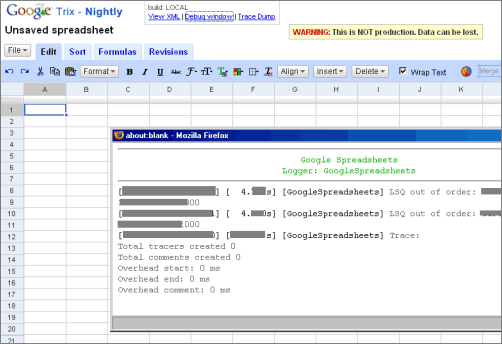
If you work in a team for a product, you may also get a prototypical version of the service. Below for instance is a screenshot from a nightly build of Google Spreadsheets – codename “Trix” – which we were able to take a look at (note several areas in this image have been grayed out):


In above image you can see the disclaimer “Warning: This is NOT production. Data can be lost.” Special links to debug windows are offered to developers as well, one of them being opened in the screenshot. Google employees also get to see previews of completely unreleased tools, such as wiki service JotSpot (which is being integrated into Google Apps), or Platypus, the internal Gdrive client for file-sharing.

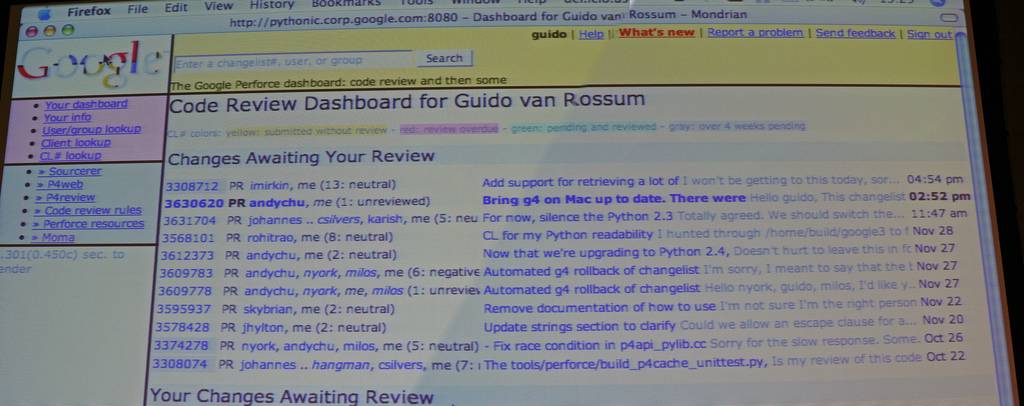
For code reviews, Google created Mondrian, a “Perforce backend with some custom Google wrappers on top,” as Nial Kennedy, who shot the following photo Creative Commons-licensed, notes:


And the following image shows Google in-house tool Trax (this is part of a larger photo by Google employee Andrew from Flickr, but it is not available anymore; we’re not quite sure how this tool works or what it achieves):


But, Google doesn’t just use their own tools. For instance, we came across information indicating that many Google employees prefer social network Facebook.com to their own production, Orkut (e.g. some Google employees considered Orkut too spammy, or too buggy in the past).

If a Google employee encounters trouble with any Google tool, they can call their internal support hotline named “Tech Stop.” The hotline promises 24-hour availability. Numbers like +1 877... (last part depleted) are partly toll-free and partly with toll, and accessible from all over the world. Internally, a Google employee may also simply press 3-HELP (3-4357). Tech Stop centers aren’t just located in the US, but also in places like Hyderabad, India.

Related Posts:

Create your own ANIMATED MOVIES for FREE

xtraNormal is a very cool beta web service that lets you create your own animated films using their very slick online movie maker software.
make animated movie
Here is an example of a video created online by someone using xtraNormal:
http://www.xtranormal.com/watch?e=20081016002442979
Pretty cool eh!? The awesome thing about this site is that you don’t even have to register or create an account to start making your own animated movies. Just click on Make Movies at the top and you’ll be brought to the movie templates page. Here you can choose whether you want one or two actors (that’s the max right now) and if you want black and white or color characters.
make your own animated movie
Once you click on one of the characters, the main editing window comes up. On the left are the tools you can use to direct the action, such as cameras, animations, expressions, looks, pauses, etc. These are basically ways to direct the movie.
direct movie
In the middle is the actual script for the animated movie that you can just type! Yes, the cool thing is that you can just type the text and when you play the movie, the text will be converted into speech automatically for you! So no need to record audio or anything of the like. At the top, you’ll see the characters and you can click on either one to write the script for that particular character.
write movie script
Finally, at the bottom is where you can design the sets, actors and the soundtracks. You can change scenes, change how the actors looks, etc.
design movie scene
In order to create your movie, start by changing your actors and designing your scene at the bottom. When you click Change Scene, you can choose from a whole host of template sets.
change movie set
Once you have done that, click Apply to make the changes. You can click the Action button at any time to render your movie and view it while you are making it. To start making scenes, all you have to do is drag and drop the items from the left onto the script boxes. Note that if you have two actors, you should press the + button to create one script box for each actor.
script block
Type the text and drag a camera or animation or expression into the text box. A pop up will appear with all of the different options, such as all of the possible camera angles for the shot.
camera angles

As you can see, this is very cool! You should obviously put a camera angle in first and then type text for the actor. You have to play around with it for a little while, but it only took me about 10 minutes to learn how to make a pretty awesome looking animated movie! Definitely a cool piece of software! Enjoy!

Get back your lost USB drive

Own a pen drive (USB stick) and have fear about losing it? Usually if a USB flash drive is lost or missing, there’s no hope of getting it back unless you have a note inside the drive or you use a marker to write down your contact on the USB drive.
The note inside may or may not capture finders attention because people generally gloss over and ignore text files. Hence, you need something to catch finder’s eye to let him know the contact information of it’s owner.
usb-lost-found
USB Lost And Found is a software program that provides an interesting way to inform a finder of an USB stick about the rightful owner. Something that might come in quite handy for British government officials and citizens working in IT. The free version can be configured to display a message that is linked to the devices autoplay mechanism.
The free version has only one method of protecting, the message method. The PRO version which comes for $3.49 has another method called lock down.
Everything about the software is pretty well but it will be your hard luck if it’s found by some Linux or Mac OS X user because it only supports Windows.
Download USB Lost and Found Free

Top 10 Predictions of Linux in 2009

#1: Android

I think 2009 is going to see the Android mobile operating system finally showing Apple and the iPhone that there is, indeed, another game in town. So far, we really only have the T-Mobile G1. But waiting in the wings are the Motorola Android phone, the Asus Eee Phone, the OpenMoko GTA02, and an LG Android phone. These are all rumored to be arriving some time in 2009. When they do hit the shelves, things are going to be interesting for the iPhone.

Think about it — an iPhone-like piece of hardware with open source software that anyone can develop for. No more App Store headaches. No more wondering if anyone might ever develop that killer app you need (or waiting for Apple to approve that killer app you need). Add to that the fact that the operating system itself is open, which means when problems arise they will be fixed. Oh, and need I say “copy/paste”? I didn’t think so. 2009 will bring an end to the idea that the iPhone is the only smart phone to own.

#2: GNOME vs. KDE

I think 2009 will finally see GNOME rise above KDE as the better Linux desktop. For a long time, GNOME has been suffocated by the presence of KDE 3.x and with good reason — KDE 3.x was an outstanding desktop. KDE 3.x had everything a good Linux desktop should have: user friendliness, stability, flexibility, eye candy. GNOME was trying too hard to be a bad copy of OS X. With the advent of KDE 4 the tables have turned.

This is not just a situation where KDE 4.x is so bad that GNOME, as bad as it is, is better. GNOME 2.24 is good, really good. GNOME has gone a little ways to restoring its roots and allowing a bit more flexibility with the desktop. But more important, GNOME 2.24 has finally found some solid footing. GNOME is now as stable as KDE 3.x ever was. And now that KDE has obviously decided to go down a much less popular route with KDE 4, it is going to have a hard year. More and more people and distributions will drop KDE in favor of GNOME. I realize there is no going back for KDE, but going forward better bring much more promise than this Linux desktop has shown thus far.

#3: Preinstalled

This has come and this has gone, I know. But HP is now promising to get into the “preinstalling Linux game” and that bodes well for the open source operating system. Add to this the ever-rising tide of netbook sales, and preinstalled Linux sales will begin to show improvement and continue to improve throughout the year. This will not be a flash-in-the pan like we saw with Wal-mart selling desktops preinstalled to unaware consumers. This time around, people will continue to purchase netbooks with a Linux operating system perfectly matched for the purpose. And look out Microsoft — Canonical (the founders/supporters of Ubuntu) is collaborating with AMD on a version of Ubuntu perfectly matched with the ARM processor (the processor common in netbooks.)

#4: Brtfs

Brtfs is the new copy on write file system that is focused on fault tolerance, repair, and administration. This file system offers Linux something that other file systems lack: the ability to scale to the level of larger enterprises. Version 1 of this file system should arrive in 2009, which could mean that by the end of the year, distributions could be shipping with a large-scale, enterprise-ready kernel. This is big news for Linux because it will finally have the tools to overcome the biggest hurdle for enterprise adoption.

#5: OpenGL for the masses

This has been a long time coming. In 2008, NVidia released a version of OpenGL 3.0 driver for FLOSS OpenGL. But Mesa didn’t. Mesa, however, is back and working on a 3.0-compatible release. I am confident that other chip makers will follow suit. This will bring OpenGL to the Linux community in both proprietary and free sources. Along with this, I can see far easier installations of such 3D desktops as Compiz-Fusion. Can you imagine Compiz-Fusion out of the box? On top of that, Linux will have a much easier time working with the newest video technology. Add to this the new drive to move video subsystems to the kernel level using GEM (Graphics Execution Manager) and KMS (Kernel Mode Setting).

#6: The cloud

I am going to preface this with a big “if.” IF cloud computing does finally gain any solid ground, Linux will lead the way. Be it on the server end or the client end, Linux already has the tools it needs to create solid cloud environments. (It has for a long time.) Linux has always been ahead of Microsoft in this respect. And if the cloud actually develops into the storm the media has been predicting, Linux will reap many benefits. I, for one, am a little hesitant to say that the cloud has arrived. Amazon already has a Linux cloud out of beta.

#7: OpenOffice 3

2009 will see far more deployments, taking a chunk out of the Microsoft Office pie. OpenOffice 3 offers a host of new features that are just right for enterprise adoption. But that is not the real kicker. With the economy as it is, companies are doing everything they can to cut costs. One area of quick and painless cost cutting is office suites. And when the typical end user starts to see how little difference there is between Microsoft Office and OpenOffice, the fire will spread rapidly. One of the issues keeping OpenOffice from the top of the charts is visibility. When people know there is a free alternative to Microsoft Office they will use it.

#8: Enlightenment

This one is a bit niche-y, but I have to address it. I believe that 2009 will see the developers of the Enlightenment desktop finally endorse E17 as stable. If you have followed the Enlightenment window manager (my favorite, by the way), you know that E16 has been the default forever and E17 has been the unstable development branch forever. 2009 will see E17 be listed as stable. However, I hope that E16 goes nowhere. The E16 version of Enlightenment is one of the best holdovers from Linux’ romantic period. I can still say, “This desktop I am using now is the same as it was when I was using back in the day.” So even when E17 becomes stable in 2009, I hope E16 is always around.

#9: Ubuntu

I see two things happening with Ubuntu. The first is that Ubuntu server will finally be adopted as a viable solution for enterprise server needs. The second is that Ubuntu 9.04 (Jaunty Jackalope) will find its way to the desktop and become the de facto standard of the user-friendly level of Linux operating systems. Ubuntu already has a strong hold on entry-level user installs. With 9.04, Ubuntu will probably deliver the best benchmarking of any desktop Linux ever, as well as the best hardware support. With the possible adoption of EXA acceleration, ATI video cards will see vastly improved support, and wireless/Bluetooth will include a powering-down feature. Ubuntu 9.04 will give Linux a much-needed push onto the desktop in 2009.

#10: Firefox

This one is quickly becoming a no-brainer. Firefox will, in 2009, finally usurp Internet Explorer as King of Browsers. It’s been a long time coming, but the problems Internet Explorer has faced in 2008 will show Firefox reaping the benefits. And I think this time around, it will go well beyond Firefox seeing a jump in usage. Firefox will take the lion’s share of the user base away from Microsoft. Because of this, the ‘net will become a safer place and fewer bugs will be reported. But by the end of the year, Google will release a mass-appeal-ready version of Chrome, which will chip into both Firefox’ and Internet Explorer’s pies. The browser wars will be renewed.

Bright future

I think the trends in 2009 are sure to bring a smile to the faces of the Linux and open source communities. What do you think? Is 2009 going to finally be the year of Linux? If so, why?

Related Posts: