Nobody can argue that Windows PC's need firewall protection. The number of threats that computer users are faced with grows daily, and being infected with a computer virus is no joke. A virus can destroy your personal files, your hard drive, and waste bandwidth and even steal your identity! As cyber criminals become more sophisticated with their tactics, computer users need to become more careful with their computer security. This means a full PC security system needs to be in place.
A firewall is essential for any PC user who values their security when connecting to the internet. Windows users are especially vulnerable to threats, and require extra protection to other computer users. Windows users will notice that their operating system comes with a default firewall, but PC security experts all recommend replacing this with a more powerful firewall.
So, where do you begin on your quest for the perfect firewall? With some good old fashioned research! Luckily, it's easy to research and download a number of firewalls, without spending a dime! This article will explore some of the best firewalls for Windows PC's, and help you to make the best choice.
The best firewall for windows PC's:
The following firewalls are consistently praised in reviews and well worth trying out. Many of them are even free! This is list is not presented in order, as each firewall has its own strengths and weaknesses which appeal to different types of computer users.
- Zone Alarm Pro: This Windows compatible firewall is easy to use and effective at keeping unwanted connections from connecting through your network.
- Comodo firewall: The Comodo firewall is often praised in reviews, as are the Comodo antivirus products. There is a free firewall and antivirus combination suite, as well as the paid "Pro" version that promises slightly better overall security.
- ESET smart security firewall: This firewall comes from NOD32, a well-known and liked antivirus program. The ESET firewall is effective and easy to use, and free to try for 30 days.
Installing a firewall is as easy as visiting the website and clicking on the "free download" button. If you want slightly stronger 'pro' protection you might need to have your credit card handy. Gone are the days when you needed to walk into a computer store or hire a security professional to get your firewall up and running! These firewalls are easy to use and promise the ultimate protection for windows users.
With the right firewall protection, your network is safer than it was without. With so many fantastic free firewalls on the market, it would be a waste not to install a few and see how they perform. It's also worth bearing in mind that your firewall will become less obtrusive with time, as the program begins to understand which connections are allowed and which are not, you will notice fewer pop ups.
While you could take your chances with the Windows firewall, you are much safer with one of the firewalls mentioned in this article. Why take chances when it comes to internet security?
Source: ezinearticles
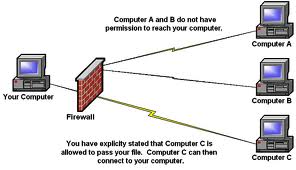 A personal computer connected to the Internet without a firewall can be hijacked and added to an Internet outlaw's botnet in just a few minutes. The Internet is a hostile network like the wild west without a sheriff!