Showing posts with label firewall support. Show all posts

Firewall Configuration

firewall

A firewall is a device or a set of devices, which can be implemented in any of the hardware, software or both. All the messages passing through the firewall are verified to meet some level of security criteria.

It acts as a computer security barrier, which analyzes all the incoming and outgoing traffic to and from your computer or network based on the firewall settings. There are some common types of firewalls like: Application level gateway, Packet filtering firewall, Circuit gateways and Hybrid firewall.

Application level gateway firewall works on the application layer of the protocol stack. It works more intelligently than the packet filtering firewall. Packet filtering firewall examines the information contained in the header of the message packets.

There are some factors based on which the filters can be added or removed from the firewall:

1. IP address

2. Ports

3. Protocols

IP address: Every computer connected to Internet has a unique IP address. The firewall configuration can be customized to block any IP address so that your computer will not allow any kind of communication to take in between.

Ports: The firewall can be configured to allow or block messages from any port number.

Protocols: There are some commonly used protocols like IP, HTTP, TCP, FTP, and SMTP etc., which can be included in the firewall filter.

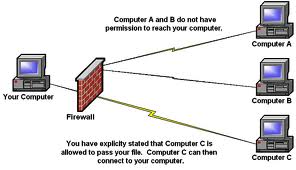
Some operating systems, such as Microsoft Windows offer built-in firewalls that are turned on by default to block all the incoming threats from Internet. There are several other third party firewalls available. You can choose any one the firewall to replace the default firewall in Windows.

Firewall Configuration

firewall

A firewall is a device or a set of devices, which can be implemented in any of the hardware, software or both. All the messages passing through the firewall are verified to meet some level of security criteria.

It acts as a computer security barrier, which analyzes all the incoming and outgoing traffic to and from your computer or network based on the firewall settings. There are some common types of firewalls like: Application level gateway, Packet filtering firewall, Circuit gateways and Hybrid firewall.

Application level gateway firewall works on the application layer of the protocol stack. It works more intelligently than the packet filtering firewall. Packet filtering firewall examines the information contained in the header of the message packets.

There are some factors based on which the filters can be added or removed from the firewall:

1. IP address

2. Ports

3. Protocols

IP address: Every computer connected to Internet has a unique IP address. The firewall configuration can be customized to block any IP address so that your computer will not allow any kind of communication to take in between.

Ports: The firewall can be configured to allow or block messages from any port number.

Protocols: There are some commonly used protocols like IP, HTTP, TCP, FTP, and SMTP etc., which can be included in the firewall filter.

Some operating systems, such as Microsoft Windows offer built-in firewalls that are turned on by default to block all the incoming threats from Internet. There are several other third party firewalls available. You can choose any one the firewall to replace the default firewall in Windows.

Home PC Firewall Guide

A personal computer connected to the Internet without a firewall can be hijacked and added to an Internet outlaw's botnet in just a few minutes. The Internet is a hostile network like the wild west without a sheriff!

A firewall can block malware that could otherwise scan your computer for vulnerabilities and then try to break in at a weak point. The only way to make a home computer 100% secure is to turn it off or disconnect it from the Internet.

Home PC Firewall Choices

Microsoft Windows Firewall -- The Windows 7, Vista and XP Service Pack 2/3 operating systems have firewalls built in that are turned on by default to block threats from the Internet. You should leave this feature turned on until you replace it with third-party software and/or hardware.

Two-Way Third-Party Firewall Software -- These firewalls block both incoming and outgoing threats. A computer has outgoing threats when it becomes infected with a virus, Trojan horse or spyware. A challenge for this type of firewall is to distinguish between threats and legitimate software. Three common ways to address this are by vendors including a list of safe software for the firewall to check [white list], malware to block [black list] and/or by issuing a pop up alert to the user asking for advice on what to do [better for experts]. For links to vendors and reviews of over thirty products, see our Personal Firewall Reviews page.

What are the benefits of Firewall Configuration?

Internet is a huge inter networking of individual computers. As a stand alone component, there is no danger of outside attacks for our system (without the use of pen drives and compact drives in the system), but connectivity to other networks results in vulnerability to attacks. So there is need for a strong protection to our computer. Firewall fulfills this requirement of computer users.

Firewalls are used to create control points on the border security of the networks. It can be either installed as a software program in a computer or it can be coupled with a separate hardware like router software. A good professional expertise helps in proper setup and configuration of firewall.

Firewall obstructs incoming and outgoing traffic from your computer, but if you want to have a clever watch on hackers who does not leave any chance to steal your personal information, then it is necessary that your firewall must be fully activated. Guidance from a certified technician helps to optimize your firewall security and you can fully assured for the safety of your data.

There are lot of advantages with using firewalls like security for both inbound and outbound traffic, windows firewall comes with the operating system and is highly efficient, proprietary firewalls ( that comes with their own operating systems) provides high level of security, response time is very high in case of high end firewalls etc. All these features will be easily available for the users when they use the services of a certified technician to configure firewall.

A firewall allows you to open ports you wish to use and block other ports you might not require. Sometimes you have a need for addition of an instant messenger or any multiplayer game, in that case you have to configure firewall and allow this type of traffic. However you must keep in mind that addition of functionality reduces the security so try that you only add any functionality if there is an urgent requirement for that.

A firewall is very important for your system because it save the system from outside attacks and retains the safety of your computer. There are many companies in the market today that provide remote computer support for firewall setup and firewall configuration. Choosing a good technician in this field needs some research but be sure that you will hire the best one in the industry if you are really concerned about the safety and durability of your system.

Firewall Configuration

firewall

A firewall is a device or a set of devices, which can be implemented in any of the hardware, software or both. All the messages passing through the firewall are verified to meet some level of security criteria.

It acts as a computer security barrier, which analyzes all the incoming and outgoing traffic to and from your computer or network based on the firewall settings. There are some common types of firewalls like: Application level gateway, Packet filtering firewall, Circuit gateways and Hybrid firewall.

Application level gateway firewall works on the application layer of the protocol stack. It works more intelligently than the packet filtering firewall. Packet filtering firewall examines the information contained in the header of the message packets.

There are some factors based on which the filters can be added or removed from the firewall:

1. IP address

2. Ports

3. Protocols

IP address: Every computer connected to Internet has a unique IP address. The firewall configuration can be customized to block any IP address so that your computer will not allow any kind of communication to take in between.

Ports: The firewall can be configured to allow or block messages from any port number.

Protocols: There are some commonly used protocols like IP, HTTP, TCP, FTP, and SMTP etc., which can be included in the firewall filter.
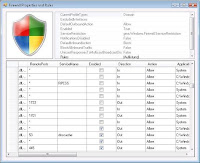
Some operating systems, such as Microsoft Windows offer built-in firewalls that are turned on by default to block all the incoming threats from Internet. There are several other third party firewalls available. You can choose any one the firewall to replace the default firewall in Windows.


Firewall Configuration

firewall

A firewall is a device or a set of devices, which can be implemented in any of the hardware, software or both. All the messages passing through the firewall are verified to meet some level of security criteria.

It acts as a computer security barrier, which analyzes all the incoming and outgoing traffic to and from your computer or network based on the firewall settings. There are some common types of firewalls like: Application level gateway, Packet filtering firewall, Circuit gateways and Hybrid firewall.

Application level gateway firewall works on the application layer of the protocol stack. It works more intelligently than the packet filtering firewall. Packet filtering firewall examines the information contained in the header of the message packets.

There are some factors based on which the filters can be added or removed from the firewall:

1. IP address

2. Ports

3. Protocols

IP address: Every computer connected to Internet has a unique IP address. The firewall configuration can be customized to block any IP address so that your computer will not allow any kind of communication to take in between.

Ports: The firewall can be configured to allow or block messages from any port number.

Protocols: There are some commonly used protocols like IP, HTTP, TCP, FTP, and SMTP etc., which can be included in the firewall filter.

Some operating systems, such as Microsoft Windows offer built-in firewalls that are turned on by default to block all the incoming threats from Internet. There are several other third party firewalls available. You can choose any one the firewall to replace the default firewall in Windows.