Showing posts with label Blog Tips. Show all posts

Tips for adding google adsense into blog

Apparently not new to make our blog that can make money, simply by creating a blog and then list on google adsense blog we can produce.

To save the adsense code if we put in the sidebar or in the footer is enough to copy and paste the HTML in blogger but different if we want to keep it together with the content either above or below, but quite easy just by removing some code that is on adsense, orreplace the the code that can be encoded by the tools that already exist ,following an example to save the code.

The steps are as follows:
1. Log in to your Google account and you already have an account GA.
2. After a successful entry, which will have a configuration tab in your adsense account select GA.
3. Select AdSense for content and format you can customize to your liking.
4. Save the GA script into notepad.
5. Log in to your blog.
6. Select the layout tab, click Edit HTML and then check Expand Widget Templates box.
7. Then type CTRL + F or for use mozilla firefox, can go to see and then select find, after leaving the box to type search labeled ( data.post:body ).
add adsense

8. And then copy the script below us GA

get code adsense


7. Remove sign <-- and -->; before saving  In his script GA.

sav cod adsense blogger

8. Save and see the results.

Add a META Description and META Keyword on Blogger

To optimize search results (SEO) on google.com, you can add a meta description and meta keywords on your blog / website using blogspot. This we did on our customer website striated-themed crafts. This website is using the domain name in a private facility in blogspot (custom domain name).

Prior to the Meta Keyword and Meta Description, inform me first about understanding metadata. Understanding Metadata is simply in my opinion is data about a data, whether text, photos / pictures, sounds. For example in a photo taken using the camera, will have the metadata in the form of image capture date, type of camera used, image size, speed shooting, etc.. To vote, has the form of metadata, singer name, album, song name, the order of songs (tracks), the type of song, etc.. This metadata can we see one of them through File Explorer, by right-clicking the file and choose Properties (select Summary> Advanced).

Likewise, the Meta Keyword and Meta Description, it also forms a second meta application / visualization of metadata. As the name implies, Meta keywords are keywords that represent the content of the website / blog, so Meta Keyword itself contains words or phrases, for example on a website / blog that contains a GSM mobile phone technology, then the keyword (keywords) which could represent, among others: GSM, mobile phone, 3G, 3.5G, GPRS, EDGE, Symbian, Nokia, Sony Ericsson, Samsung, and so on. Meta Keyword itself can help increase traffic to your website / blog via search engines, for keywords that we make in the Meta Keyword is also one part that is indexed by search engines. The more precise we choose keywords, it will help in SEO (Search Engine Optimization).

While the Meta Description itself is a short description (resume) from your website / blog, so Meta Description contains brief information about the website / blog.

Both these meta (Meta Keyword and Meta Description) mounted on the HEAD section of a website / blog. The format of the writing of Meta Keyword and Meta Description are as follows:

Here's how to enter a meta description and meta keywords on blogspot:
1. Log into Blogger
2. Click the Layout> Edit HTML
3. Back up your template as a precaution with a click downloading full template.
4. Check the box Expand Widget Templates.
5. Find the code below:
<head>
<b:include data='blog' name='all-head-content '/>
<title><data:blog.pageTitle/></title>
6. Under the above codes, put the new code as follows:
<b:if cond='data:blog.url == data:blog.homepageUrl'>
<meta content='Write your Descrition' name='description'/>
<meta content='Enter your keywords (separated by commas)'
name='keywords'/>
</b:if>

<b:if cond='data:blog.pageType == &quot;item&quot;'>
<meta expr:content='data:blog.pageName + &quot;Write your description the same as your description above&quot;' name='description'/>
<meta expr:content='data:blog.pageName + &quot;, Your Keyword the same as your keyword above&quot;' name='keywords'/>
</b:if>

7. Click the Save Template button.

Computer Tips for Computer Security

Almost all people using computers today can change them, browsing the web, check email, and run a word processing program. The problem is that while computers are easy to use, those who have no knowledge about the problem of computer crime has a very difficult time understanding the reasons why it is important to ensure that their computers safe and secure. If you do not want to find yourself you call a computer repair Delaware men to help with virus or security breach, consider doing a few tips and tricks.

1. Update Your Antivirus Software

Antivirus software is great. There are tons of great programs to choose from and they will automatically scan your PC for viruses, malware, and more. The problem is that antivirus programs do not permanently set-and-go solutions. Internet growing rapidly and if you do not update your antivirus software regularly you will be vulnerable to some of the latest viruses and internet crimes out there.

2. Lock Your Computer

Your computer is your personal space. Every person walking into your home or office should not have access to your personal information. Log into the habit of locking your computer every time you walk away, even if you just walk out to the bathroom. computer security breaches can occur in a matter of mere minutes. Enter a password to login again will only take seconds and you will immediately return to work.

3. Avoid Strange Email Link

Be cautious when you receive an email from the company requesting your personal information, even if they look legitimate. Hackers will create an email address that appears similar to that used by the formal organization, but only slightly different. They will send you to web pages that seem to log-in page for the site you're used to. When you enter your information and recognize that you are in the wrong place, you will be given your user name and password. Do not use the link in the email to log-in page if you can avoid doing it.

4. Update Your PC Security

You may receive periodic emails from Microsoft to let you know that the latest security patches have been developed. Do not ignore an email or pop-up messages. They are designed to immediately improve the security breach that the developers identify the platform. Ignore this email and failed to make the update will leave your computer vulnerable as well. Not getting notifications? Go to Windows Update Center and find their own.

5. Select a Strong Password

According to the United States Computer Emergency Readiness Team, the attacker has access to a number of programs that enable them to find out your computer passwords. The more complex your password, the more work will be for them to know, and the more likely they will give up and switch to something easier. Choose a password with numbers, spaces, special characters, and a combination of both upper and lowercase letters.

Use care and caution when using your computer. Every time you enter the Internet you open yourself to potential security breaches. If you are not careful, you will be the next person you call a computer repair technician Delaware to help get things back to normal - even if possible!

Article sourcehttp://EzineArticles.com/?expert=Shelly_Bailey 

Google has updated Page-rank

Google has updated Page rank, google page rank update is 3 months and now have google page rank update for our blog.
whether there are among our blog page rank goes up it, try to check our page rank. I hope our page rank blog can increase after google update page rank if that has not increased its page rank, so be patient and keep the spirit of blogging :).That's all.!!!


List site to check pagerank.

1. Mypagerank
2. Pr Checker

39 Do-Follow Social Bookmarking Sites

Increasing number of developments in the Internet world of social bookmark websites (web 2.0) nowadays are often also make us confused to select which one. This 39 Do-Follow Social Bookmarking Sites Although in general it can provide benefits to our website, it will be optimized if we choose to bookmarking on social media sites that implement the Do-Follow tags alone.

One-way backlinks to the pages of a domain gives the authority on Google from time to time. One strategy to get backlinks is to bookmark your content on social bookmarking sites that do not use 'nofollow' tag. In general, the higher the PageRank (PR) sites, the better.
New Free Automated Bookmarking Software

The key to effective social bookmarking is to do it on a large scale - the best bookmark all of your content regularly and bookmark the sites as much as possible. I have listed several dozen sites here and so even if it only takes you a few minutes for each one you are looking for about an hour of your time if done manually!

Here is 39 list of social bookmarking websites that use DoFollow tag along with its Page Rank, hopefully useful to you. If there are not already registered here or there is a mistake, please be added or corrected.

  1. Digg [PR] (8)
  2. Folkd [PR] (7)
  3. Spurl (6)
  4. Kwoff (6)
  5. LinkaGoGo (5)
  6. SpotBack (5)
  7. MyLinkPRault (5)
  8. A1 Webmarks (5)
  9. Tagza [PR] (5)
  10. Plime [PR] (5)
  11. Searchles [PR] (5)
  12. DoFollowDigg [PR] (4)
  13. Feedmarker (4)
  14. Memfrag (4)
  15. MySitePRote [PR] (4)
  16. OldRec [PR] (4)
  17. Wagg It [PR] (4)
  18. Otherwhirled [PR] (4)
  19. OYAX (4)
  20. TeDigo (3)
  21. MyPIP (3)
  22. Yattle (3)
  23. Kabulis (3)
  24. Bukmark [PR] (3)
  25. Ciudadlaberinto [PR] (3)
  26. Cool Search [PR] (3)
  27. Gozoof [PR] (3)
  28. Tamilers [PR] (3)
  29. Ziki [PR] (2)
  30. Agroots [PR] (2)
  31. Best of India [PR] (2)
  32. Promote Your Website Free [PR] (2)
  33. Zobbed [PR] (2)
  34. Dizzed [PR] (2)
  35. Yomash News [PR] (2)
  36. Bookmark 24 [PR] (2)
  37. 180 Blog Network [PR] (1)
  38. 180 Blog Network [PR] (1)
  39. Yoo Submit [PR] (1)

Why Use Social Bookmarking?

Every time you add a bookmark to one of your pages in one of these sites you create backlinks. If you bookmark any piece of content that you create in all these sites you can build a lot of backlinks from time to time. For best results, you want to make sure that bookmarking sites provide real, do-follow links. There is much debate about whether or not no-follow links are still useful so I will not get in here. But one thing you want is a real link. Some sites do not provide real-backlinks - they use their own form dynamic links are not counted as backlinks.

One other thing to note is that although this is your personal bookmarks, you need to ensure that they are public - that means someone else (Google really) to find them. But be careful, some sites such as Connotea bookmarks have a special niche and probably wont appreciate your toenail clippings bookmarks.

How to Bookmark For SEO

The purpose of this exercise is to generate backlinks to our content pages that help them rank better in Google. I’ll assume that each piece of content is optimised for some keyword. There are usually three places where you can add information:
  • The title
  • Tags
  • Description
Make sure your keyword is in all three of them. Note that the title especially usually becomes the anchor text that is used in the resulting link so the title is arguably the most important element to get right. make your bookmark for SEO.

Reference : Caroline -Middlebrook

Free Backlink To more 2500

Getting backlinks is a One measure of blog your worth in the google and Comrades. The more the better MANY New Articles The Permanent have relevant sales. It's a LOT of websites backlinks Also offers free even paid. BUT sector Logo What We liked the free. So I will give a free tool to get a backlink to the 2500+.


This script create a page on your website / blog to everyone from the website, so that the page is about 2500 + different from the backlinks pointing back to your website. Yes some of them are no-follow and some of them do-follow, but the bottom line is that this is a well established site regularly crawled by Google and other SE, so that your pages and backlinks on sites will be found and the website / blog will get backlink and will be visited more frequently and indexed by Googlebot and many other search engine bots such as Yahoo, Bing, Baidu, etc. From  IMT Website Submitter.

If your website or blog has an LOT We backlinks from websites or blogs The number of his New Articles anchor text contains targeted keywords All of us, so in addition to indexed Fast .. popularity of the site We will also be increased in the eyes of google, it is hoped that the website New Media We Can occupy the highest position at page search engines google for that keyword Who We target.

Here This Link for free backlink 100 to 2500 + below :

Backlink Checker

Check baclink is free tool to know about our inbound link. how many backlink to our web/blog we have.
Inbound link is links that lead to our blog on either the main or index homepage can also lead to inner page or pages from the web postings of others or our web / blog that has a different domain. Create a link indbound main aim to get lots of backlinks for your blog or posting the position that we want to optimize for example the keyword computer tips and the other to achieve a strategic position, whether it be on the main page with the highest ratings.


Insert your domain in the box below:
Your domain:


(eg. example.com)


Lots of ways to create an inbound link that leads to our weblog for example just with the old technique, looking for good quality backlinks, exchange links and banners, commenting on blogs dofollow or also with other techniques that are commonly done by many bloggers seo lovers, if I except looking for inbound links techniques I mentioned above I also tried to find backlinks from web directories, is sizable enough to lift Pagerank our blog.
In addition to using the way or seo techniques as above we can also create a lot of inbound links by creating a lot of blogs dummy, of course with the care of these blogs on a regular basis for more and more backlinks that we can to our main blog, and remember try a different IP every blog dummy you make the more often a dummy with a different IP it will be fresher the more backlinks you get, and also could have moved the blog Pagerank to rise, or also want to with a technique that is a bit of black that is using the link spamming / comment spamming yes please, but Just keep the niche.

Build an inbound links can be said to be difficult easy, the difficulty may take a little longer and do a search here and there especially for the bloggers seo beginner like me can say a bit difficult. But the difficulty in building many inbound links should not be used as a barrier to our passion to achieve the most strategic position in the search using specific keyword search.

Auto submit to social bookmarking site

OnlyWire is one of the auto submiter social bookmarking that I think can be very beneficial to our blog.
with OnlyWire our posts can be transferred to our multiple social bookmarking accounts automatically.

but even sometimes to submit to multiple social boomarking occasionally be delayed for a while and probably will take more time, and probably only a few social bookmarking to be successful on submit. but that's not important because we can resend again :).

Steps to start a register to OnlyWire:

1. Go to OnlyWire site here.
select the appropriate account with your need.
for the first user might  to use the free account.


2. Fill in all the information needed by OnlyWire and then click register, active your account on your email address.
3. Log in to onlywire and go to start.

  • Install the OnlyWire Submitter on your computer. Download the Submitter
After download, install OnlyWire into your computer and enter your username OnlyWire.
See this onlywire shorcut on the taskbar, right click the shorcut button  and  Authorize account. fill with your onlywire user name.


  • Set up social networking services for your account. Setup Your Services
Fill of all the social networking serices you have, if you do not have an account, then register once to the relevant social networking. after that go back to OnlyWire and fill in accordance with an account that has been on list on the social networking.
  •  Install the Bookmark & Share button on your websites. Get Your Button
OnlyWire Copy and paste your script to your blog, you can see how to adding social bookmark button here.
  •  Start posting to OnlyWire! Post Now
or you can click right hand on the onlywire taskbar and choice post, you will bring to onlywire site like bellow.
Auto submit bookmarking onlywire

this if you are ready to share to some social networking simultaneously and automatically OnlyWire will submit to several social networking sites that you list it at OnlyWire.

Adding Social bookmark Button to Blog

Adding social bookmarking button to our blog is the most important thing in my opinion, because by adding a social bookmarking button on the blog, we can share our posts to various social bookmarking to increase traffic or backlink from them, and sometimes shared by several visitors what if our posts are considered good and important to them.
a lot of social bookmarking buttons offered by some sites, and it is very good because with so many social bookmarking buttons bid so we can choose which is best will be posted on our blog.

Some sites provide free social bookmarking button.

1. Addthis  Go to site here

addthis button
2. Add to Any <-- go to site here.
add to any button
3. Onlywire <--go to site here.
onlywire button

4. Bookmark button <--go to site here.
bookmark button

5. SEO Centro <-- go to site here.
6. Social Poster <-- go to site here.  And many more...

we can adjust social bookmarking button to the side bar widget
or after the title or below the post.
1. Adding social bookmark to the side bar / widget.

  • Login - Layout
  • Click Add Gadget :
  • adding social bookmark to blog


  • Click HTML/javascript :
      click html widget social bookmark
    • Place Script Button From social bookmark site, in title you can give anything you want and click Save  :
    •  

    2. Adding Social Bookmark Button under Post :
    • Login - Layout - Edit HTML 
    • Don't forget to check the sign Expand Widget Templates 
    • Put the following code before the code, ]]></b:skin>
      .anything { background: #000000; -moz-border-radius: 5px; border: 0px; padding:5px 5px 5px 5px; margin: 0 0 0px 0; }
    • Then find the code <data:post.body/> (usually there are two codes,select the code that top / first),put the following code underneath :
      <b:if cond='data:blog.pageType == &quot;item&quot;'>
      <div class='anything'><center>
      "put your Social bookmark script here"
      </center></div>
      </b:if>
    • Save

    Benefits of using social bookmarking

    Some benefits of using social bookmarking, I would give a little explanation of social bookmarking for those of you who still newbie like me:).

    Social bookmarking is a site that provides services to store the URL addresses for the user should. Understanding simple like that, let me just quickly passable we discussed about the bookmarks, just to social bookmarking sites, !
    Social Bookmark Originally created to facilitate storing the address URL of the site a favorite. Actually this feature already exists in the browser (firefox, internet explorer, opera, etc.) and we can keep it in our local computer.
    this is a service to keep the links page that you find interesting with a brief description (pieces of the article) and the tags that you set yourself. Social Bookmarking sites provide convenience for all users to tag articles and distribute content from their favorite sites. In addition, the social bookmarking site can also be said to be the site collecting the latest news from other sites, both blogs and websites .. In social bookmarking, news content is a collection of articles from other websites that are registered or submitted by others or even your own. Basically, anyone (including you) can register and submit links to articles from your website or blog to the social bookmarking site of this. For example, if you find this article interesting and useful, you can mensubmitnya to social bookmarking services like digg.com, delicious.com, Slashdot.com, even facebook.com.

    WHAT BENEFITS Social Bookmarking?

    1. Increasing SERP.
    By doing submit dofollow social bookmarking to it will increase the backlinks to our site. The more backlinks that point to our site will increase our site's ranking on the SERP (search engine result pages).

    2. Increase backlinks.
    By submit to dofollow social bookmarking then your blog increase backlinks from social bookmark.

    3. Increase Traffic.
    If our site's ranking in the SERP increase the number of visitors to your blog or website we will also rise. In addition we can also get direct traffic from social bookmarking site.

    4. Quick indexed in Search Engines

    Search engines often crawl social bookmarking sites several times a day. By submitting your site to a social bookmarking site so we are also relatively quick to indexed by search engines.

    5. Improve PageRank
    Many social bookmarking sites with high PageRank using the dofollow tag. Therefore, if we diligently submit to social bookmarking sites then it is likely to increase the PageRank of sites we are also getting higher.


    Because the benefits quite a lot, a lot of bloggers who intentionally bookmark the pages from their own blogs. This is certainly legitimate. And I was advise to bookmark each article on your blog to dozens of these Social Bookmarking sites to get the benefits I mentioned earlier.

    Vertical CSS Dropdown menus Navigation Work with ie

    In my previous post I've shared with horizontal css that works with IE and now I will try to share another post in connection therewith, Vertical CSS Dropdown Menus work with IE.
    one to make our blog look attractive and easy to explore by visitors.

    Below the steps :
    1. Find this code ]]></b:skin>
    2. Place below CSS style before]]></b:skin> :
    #menu2, #menu2 ul, #menu2 li{
    margin: 0;
    padding: 0;

    }

    #menu2 li {
    /* make the list elements a containing block for the nested lists */
    list-style: none;
    position: relative;
    width:180px;
    cursor:pointer;
    z-index:9999;
    overflow:none;
    margin:-5px;
    }

    #menu2 li:hover ul, #menu2 li.hover ul {
    display: block;
    position: absolute;
    margin: 0;
    padding: 0;
    left:185px;
    top:5;
    }
    #menu2 ul ul{
    position: absolute;
    top:0;
    visibility:none;
    }
    #menu2 li ul {
    display: none;
    width: 11em; /* Width to help Opera out */

    }
    #menu2 a, #menu2 h2 {
    font: bold 11px/16px arial, helvetica, sans-serif;
    display: block;
    border-width: 1px;
    border-style: solid;
    padding: 2px 3px;
    }

    #menu2 h2 {
    color: #fff;
    background: #000;
    text-transform: uppercase;
    }

    #menu2 a {
    color: #000;
    background: #efefef;
    text-decoration: none;
    }

    #menu2 a:hover {
    color: #a00;
    background: #fff;
    }

    #menu2 ul ul ul {
    position: absolute;
    top: 0;
    left: 100%; /* to position them to the right of their containing block */
    width: 100%; /* width is based on the containing block */
    }
    3. Then Find this code </head>
    4. Place this code before </head>

    <script src="http://digitaltablet.uni.cc/wp-content/uploads/2011/02/script-hosrizontal.js">
    </script>

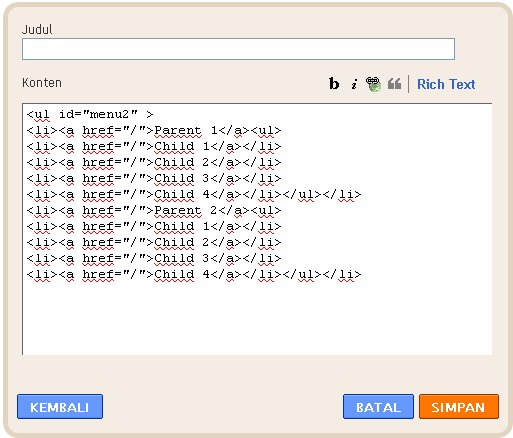
    5. Copy and Paste this code to Current Setting:
    <ul id="menu2">
    <li><a href="http://www.blogger.com/">Parent 1</a><ul>
    <li><a href="http://www.blogger.com/">Child 1</a></li>
    <li><a href="http://www.blogger.com/">Child 2</a></li>
    <li><a href="http://www.blogger.com/">Child 3</a></li>
    <li><a href="http://www.blogger.com/">Child 4</a></li>
    </ul>
    </li>
    <li><a href="http://www.blogger.com/">Parent 2</a><ul>
    <li><a href="http://www.blogger.com/">Child 1</a></li>
    <li><a href="http://www.blogger.com/">Child 2</a></li>
    <li><a href="http://www.blogger.com/">Child 3</a></li>
    <li><a href="http://www.blogger.com/">Child 4</a></li>
    </ul>
    </li>
    </ul>

    Change The red text with your url and your Link name.
    6. Save your template.

    or You can add new HTML/javasrcipt :

    Here the full code Download Here

    Adding a Technorati button to your blog

    Adding a Technorati button to your blog helps you to promote your blog. These buttons allow visitors to fav and share your blog with others in the Technorati community.one to increase our blog traffic, we have a lot to post to various bookmarking, and this is one of them.
    share your post to technorati fav. you can share your blog posting to favorite technorati.


    Code
    <a href=”http://technorati.com/faves?sub=addfavbtn&amp;add=http://computer-help-tips.blogspot.com“><img src=”http://static.technorati.com/pix/fave/tech-fav-1.png” alt=”Add to Technorati Favorites” /></a> 
    Code end

    Replace the text in red with your blog URL.
    All you have to do is copy and paste the code into your blog. You should be able to use the Text/HTML widget.
    actually I already  used to on the site technorati but now i'm looking for my technorati widget on their own but there is no place where approximately widget.
    i found this button in Technicalauthors

    Horizontal CSS Dropdown Menus work with IE

    Sometimes a dropdown navigation menu can not work in IE (Internet Explorer) because there is one setting that  different between IE and other browsers. I will try to give one simple example of a dropdown menu that can work for IE and other browsers. Dropdown navigation menu one separately facilitate visitors looking for information on our blog is to provide an important dropdown navigation links from the pages of the blog. visitors so easy to find what they looking for.

    Below the steps :
    1. Find this code ]]></b:skin>
    2. Place below CSS style before]]></b:skin> :
    /-- menu2 Dropdown navigation --/
    #menu2, #menu2 ul, #menu2 li{
    margin: 0;
    padding: 0;

    }

    #menu2 li {
    /* make the list elements a containing block for the nested lists */
    list-style: none;
    position: relative;
    width:180px;

    cursor:pointer;
    float:left;
    }

    #menu2 li:hover ul, #menu2 li.hover ul {
    display: block;
    position: absolute;
    margin: 0;
    padding: 0;

    }
    #menu2 ul ul{
    position: absolute;
    top:0;
    visibility:none;
    }
    #menu2 li ul {
    display: none;
    width: 11em; /* Width to help Opera out */

    }
    #menu2 a, #menu2 h2 {
    font: bold 11px/16px arial, helvetica, sans-serif;
    display: block;
    border-width: 1px;
    border-style: solid;
    padding: 2px 3px;
    }

    #menu2 h2 {
    color: #fff;
    background: #000;
    text-transform: uppercase;
    }

    #menu2 a {
    color: #000;
    background: #efefef;
    text-decoration: none;
    }

    #menu2 a:hover {
    color: #a00;
    background: #fff;
    }

    #menu2 ul ul ul {
    position: absolute;
    top: 0;
    left: 100%; /* to position them to the right of their containing block */
    width: 100%; /* width is based on the containing block */
    }


    3. Then Find this code</head>
    4. Place this code before </head>

    <script src="http://digitaltablet.uni.cc/wp-content/uploads/2011/02/script-hosrizontal.js">
    </script>

    5. Find this code :

    <div id="header-wrapper">
    <b:section class="header" id="header" maxwidgets="1" showaddelement="no">
    <b:widget id="Header1" locked="true" title="test (Header)" type="Header">
    </b:widget>
    </b:section></div>

    6. Copy paste this code after code above:


    <ul id="menu2">
    <li><a href="http://www.blogger.com/">Parent 1</a><ul>
    <li><a href="http://www.blogger.com/">Child 1</a></li>
    <li><a href="http://www.blogger.com/">Child 2</a></li>
    <li><a href="http://www.blogger.com/">Child 3</a></li>
    <li><a href="http://www.blogger.com/">Child 4</a></li>
    </ul>
    </li>
    <li><a href="http://www.blogger.com/">Parent 2</a><ul>
    <li><a href="http://www.blogger.com/">Child 1</a></li>
    <li><a href="http://www.blogger.com/">Child 2</a></li>
    <li><a href="http://www.blogger.com/">Child 3</a></li>
    <li><a href="http://www.blogger.com/">Child 4</a></li>
    </ul>
    </li>
    </ul>

    Change The red text with your url and your Link name.
    7. Save your template.

    or You can add new HTML/javasrcipt :


    Here the full code Download Here

    Google panda update 2011 Tips

    google panda
    There are so many felt in some my blog, with a change in google panda update also felt by some sites / blogs of the impact, visitors and rank in google have come down, for most companies in the Internet felt disadvantaged by the google panda update 2011.

    Such as for example EzineArticles  this site has decreased to 90% traffics, especially are my blog visitors who previously small traffic will have less visitors.:)

    with google panda update web / blogs that have a low quality may be deleted or position decreased as well as  in the saying by Google's Michael Wyszomierski, "that Improve it or remove it. With Google's Panda Update, low-quality content cans impact an entire domain, but removing these pages - or moving Them to a different domain - cans help your rankings",.

    google created Some tips in Google Webmaster Central, Some he tried to offer additional guidance to sites That have been impacted:

    Our recent update is Designed to reduce rankings for low-quality sites, so the key thing for webmasters to do is make sure Their sites are the highest quality possible. We looked at a variety of signals to detect low quality sites. Bear in mind That people searching on Google typically do not Want To see shallow or poorly written content, content that's copied from other websites, or information not That That are just useful. In Addition, it's Important for webmasters to know That low quality content on part of a site cans impact a site's ranking as a whole. For this reason, if you believe you've been impacted by this change Should you evaluate all the content on your site and do your best to improv the overall quality of the pages on your domain. Removing low quality pages or moving to a different domain Them Could help your rankings for the higher quality content.

    We've been reading this thread Within the Googleplex and appreciate both the concrete feedback as well as the more general suggestions. This is an algorithmic change and it does not have any manual exceptions applied to it, but this will of some useful feedback As We work on future iterations of the algorithm
    So about them to provide solutions to some sites / blogs that have been affected. we should start the first step again to immediately correct these mistakes in your web / blog that has a low content and / or the original  content that we have not copy and paste on your site that has a copyright license.

    As has been said in my previous post titled "New Google Algorithm Update 2011 Blog Traffic Down."
    google panda update should now have such criteria.

    1. Do not copy-paste.
    2. Update your blog is as Often as possible, but with a proportionate amount.
    3. Write an article for the benefit of the reader, so at least not like the content AGC.
    4. placement of content that is not preceded by a lot of good ads, just enough to simplify the ad at the beginning of the content, it also seems to have an influence.
    5. A good quality backlinks to improve quality in the eyes of google, not a backlink that has low quality because it will be ignored by google.


    First, there’s Sistrix, which monitors 250,000 keywords in Google up to the first 100 ranking positions for each: Source : http://www.seomoz.org/blog/googles-farmer-update-analysis-of-winners-vs-losers
    # Domain Change SISTRIX (before) SISTRIX (after) # KWs (before) # KWs (after)
    1 wisegeek.com -77% 121,58 28,22 74.024 21.940
    2 ezinearticles.com -90% 65,08 6,65 184.508 54.277
    3 suite101.com -94% 54,04 3,28 178.373 36.904
    4 hubpages.com -87% 55,16 7,40 152.998 50.178
    5 buzzle.com -85% 43,25 6,55 86.472 24.423
    6 associatedcontent.com -93% 38,29 2,57 216.429 53.512
    7 freedownloadscenter.com -90% 30,26 3,01 42.486 7.992
    8 essortment.com -91% 25,73 2,32 27.501 7.459
    9 fixya.com -80% 28,78 5,83 62.034 36.167
    10 americantowns.com -91% 24,88 2,18 26.000 9.799
    11 lovetoknow.com -83% 25,75 4,28 49.544 17.833
    12 articlesbase.com -94% 19,96 1,16 82.274 31.365
    13 howtodothings.com -84% 21,20 3,39 33.222 7.601
    14 mahalo.com -84% 20,49 3,23 33.875 9.740
    15 business.com -93% 17,24 1,13 21.556 4.813
    16 doityourself.com -77% 20,89 4,90 23.256 6.870
    17 merchantcircle.com -85% 18,43 2,67 93.347 34.681
    18 thefind.com -83% 18,95 3,27 74.506 45.495
    19 findarticles.com -90% 16,98 1,74 64.810 20.189
    20 faqs.org -91% 16,52 1,46 33.648 11.142
    21 tradekey.com -89% 16,83 1,79 37.364 16.268
    22 answerbag.com -91% 12,93 1,11 67.314 26.054
    23 trails.com -87% 12,05 1,62 38.346 8.511
    24 examiner.com -79% 10,54 2,19 70.781 31.272
    25 allbusiness.com -88% 8,86 1,08 16.457

    Add site / URL to blekko

    Submit site to blekko add to blekko each url to the index in blekko. Blekko is a Search Engine is designed to eliminate spam that plural appears in search results by placing a sign slashtag in each search word. The first honest I tried it also confused, so what's the point Slashtag use, because so far I do not ever find any slashtag in Search Engines, for example, after entering into Blekko.com, I tried the search keywords shopping there, and after waiting a while, Blekko will give results they think relevant search and free of SPAM (excellence Blekko) after that Blekko will give slashtag next to the left as a given shopping Keyword slashtag  /shoppingblog, / charity, / shoes, / green, and / tec. And after you register on Blekko.com as User, you are going to be given the right to make Slashtag own, which will be in the Follow by others or vice versa you can also become Follower Slashtag them.

    To know Blekko.com further, I would invite you to join register yourself and become a User Blekko.com.

    First of all please go to https: / / blekko.com / join, though still Beta Blekko was already using a Secure Url username and password so your data more secure, you can register with your facebook, after that you will be taken to the Page as below:
    blekko register form

    Please fill out the registration form ... And after that click the Join Button ... and you will be taken to a page like this:
    blekko dashboard home
    You can register with your username facebook,And please fill in the information yourself to your User Profile Blekko and which should be mandatory, add your blog url because it is will get backlinks from new Search Engine, after everything is filled please click Update My Profile and see your profile.
    If you've entered your log in page, click the user name in the upper right corner
    blekko log in


    After all on the side with a complete, now it's time to add or create new slahtag, to your blog or site so that we can indexed by blekko this. Slashtag can be filled at will and most importantly we can join our Web site or blog Add all we have, so not just limited to one blog.
    To make Slashtag, click Create a Slashtag in the left sidebar, as below:


    Please fill in the information requested, here I make slashtag titled /shopping, because I want to put all my blog to Blekko.com. after your name and a keyword to Slashtag, you just enter the url that would be inserted and click the Search Button, for blogs that have been indexed like my blog, Blekko will immediately give details below and you just instantly click the + button to insert it into the list, but if your blog is not indexed Blekko, you can not directly put it to the list from there, so you have to manually write a boxed underneath. After all fully charged, you will be taken to Page Slashtag , for instance rich mine which form below:

    blekko create slashtag
    then create slahtag and the results are as below:
    You can also add your url in the add websites that are above in the right corner.
    Completed registration and the addition of our site/blog.

    And it turns out Blekko also provide assessment form for your Blog Rank, and Rank is obtained from the incoming backlinks to your blog, Keep in mind, the Blog is not indexed, Blekko not going to give rank, Rank addition, Blekko.com also provides features to view SEO Blog you its version as below:
    blekko seo

    Add Related posts for blogger

    List post titles that appear at the bottom of our posts and are usually grouped by category and is often called 'related post'. How do I display the related post on blogspot?

    Please login to your existing account on blogger then, open the 'layout' then select 'Edit HTML' for all the template code will be displayed, please give a check mark or tick (the term of the Commission) on the 'Expand Widget Templates'.
    This related posts place in the below of content.
    Find the following code </head>:

    1. Copy and paste this code before </head> :
    <script src='http://digitaltablet.uni.cc/wp-content/uploads/2011/03/Related-post-script2.js' type='text/javascript'/>

    Or Copy Paste This code
    <script type="text/javascript">//<![CDATA[
    var relatedTitles = new Array();
    var relatedTitlesNum = 0;
    var relatedUrls = new Array();
    function related_results_labels(json) {
    for (var i = 0; i < json.feed.entry.length; i++) {
    var entry = json.feed.entry[i];
    relatedTitles[relatedTitlesNum] = entry.title.$t;
    for (var k = 0; k < entry.link.length; k++) {
    if (entry.link[k].rel == 'alternate') {
    relatedUrls[relatedTitlesNum] = entry.link[k].href;
    relatedTitlesNum++;
    break;
    }
    }
    }
    }
    function removeRelatedDuplicates() {
    var tmp = new Array(0);
    var tmp2 = new Array(0);
    for(var i = 0; i < relatedUrls.length; i++) {
    if(!contains(tmp, relatedUrls[i])) {
    tmp.length += 1;
    tmp[tmp.length - 1] = relatedUrls[i];
    tmp2.length += 1;
    tmp2[tmp2.length - 1] = relatedTitles[i];
    }
    }
    relatedTitles = tmp2;
    relatedUrls = tmp;
    }
    function contains(a, e) {
    for(var j = 0; j < a.length; j++) if (a[j]==e) return true;
    return false;
    }
    function printRelatedLabels() {
    var r = Math.floor((relatedTitles.length - 1) * Math.random());
    var i = 0;
    document.write('<ul>');
    while (i < relatedTitles.length && i < 20) {
    document.write('<li><a href="' + relatedUrls[r] + '">' + relatedTitles[r] + '</a></li>');
    if (r < relatedTitles.length - 1) {
    r++;
    } else {
    r = 0;
    }
    i++;
    }
    document.write('</ul>');
    }
    //]]>
    </script>


    2. Find this code <data:post.body/> copy and paste code below :
    <b:if cond='data:blog.pageType == "item"'>
    <div id='related-posts'>
    <h2>Related Posts on <b:loop values='data:post.labels' var='label'><data:label.name/><b:if cond='data:label.isLast != "true"'>,</b:if><b:if cond='data:blog.pageType == "item"'>
    <script expr:src='"/feeds/posts/default/-/" + data:label.name + "?alt=json-in-script&amp;callback=related_results_labels&amp;max-results=4"' type='text/javascript'/></b:if></b:loop> </h2>

    <script type='text/javascript'> removeRelatedDuplicates(); printRelatedLabels(); </script>

    </div></b:if>
    The red text you can change according to the number of posts to be displayed.

    3. If you want  display the related posts in the sidebar you only copy 
    this code below :


    <script type='text/javascript'> removeRelatedDuplicates(); printRelatedLabels(); </script>
    new javascript

    new html
    related post

    New Google Algorithm Update 2011 Blog Traffic Down.

    Previously I do not know what's wrong with my blog traffic suddenly dropped dramatically, but after I tried googling and I found an article on blog traffic declined, and was most likely due to the New Google Algorithm Update 2011.

    The phenomenon of blog traffic down at this moment (2011) because of the google algorithm update seems to have begun to be felt by many bloggers, blog traffic down the cause is usually caused by the google dance, google sandbox, blackhat (including AGC), copy-paste the article (copy- paste can also lead visitors to the blog is reduced) and also a holiday (day off effect also turns out), but now this issue is being much talked about google algorithm that has been updated and this is currently often the reason blog traffic down, and his blog traffic down too suddenly not use permissions.

    At the end of my article will also give you tips and tricks for traffic blogs do not tend to decline.

    Many of the online business is no longer even optimize his blog that his traffic has decreased (including me) because that is google algorithm changes, because its impact was too severe, and some even make his blog from the beginning again.

    According to my friend's experience, his blog is usually visited by the 2000s visitors per day now only 800s, wow, google algorithm update was claimed that not bad (including one of my blog), what kind of algorithms provided by google does not can we know for absolute, we can only feel and guessing just what the criteria provided by google in order to enter the front page of google search.

    Then in this article I will give tips for your blog trafficnya not go down, tips from me is:

    1. Do not copy-paste.
    2. Update your blog is as often as possible, but with a proportionate amount.
    3. Write an article for the benefit of the reader, so at least not like the content AGC.
    4. Do not use blackhat techniques, google will be a smart possible to filter sites with spam content such as AGC.
    5. The roads into the neighbor's blog, it is also important to create the image of our blog, blog traffic so we do not just rely on search engines alone.

    Ever also does this blog traffic down, but it was just a little, and certainly the range of practically still stable, and it's been going on for a minute, already natural yes, but do not always blame google which is updated with new algorithms that make his blog traffic jump free, it could be because of your carelessness for example in the plugin settings.
    Hopefully useful.
    Source : http://artikel.ilmuti.com/