Wine-Doors is an cool and easy way to install useful softwares and fonts on your PC. The best part about it is that it requires no terminal typing and it lets you install tons of softwares which includes Internet Explorer, Adobe Photoshop CS2, WinRAR, Google Sketchup, World of Warcraft 2&3, Half Life 2, Call of Duty 1&2, Steam.
According to the developers 'Wine-Doors is an Windows application management for the GNOME Desktop.'
For those of you who know 'Wine Tools' an older application, Wine-Doors picks up where it left off.Consider it as an extension to Wine. Needless to say, you'd require Wine up and running to use Wine Doors. Surprisingly before you can use the software, you have to fill in your name and company name. You also have to check mark a box which says, "I have a Microsoft license"- and you can lie!
You can download Wine-Doors by using Synaptic.
--
2 Extra fingers freaked me out!
Windows,Android,Linux,Apple Mac,Iphone,Ipad,Tips and Tricks,tutorial for Problem.Repair,Recovery,data,Troubleshooting,Computer Help,Software,Tweak Computers,Guide to Windows,linux and software Install guide.MotherBoard repair,Hardware.GSM,Phone,Wireless,WIFI,Msn,Ubuntu.Blogger tips....
Showing posts with label wine-doors. Show all posts
Run MS Paint in Linux
MS Paint is one of the first programs we ever used on PC. Finally I have managed to run the worlds best image editing program on my Ubuntu, this definitely beats the shit out of Adobe Photoshop and GIMP :p
Well, it'd be fun to try it out just for the sake of it. MS Paint has virtually remained unchanged for the last 13 yrs since it was first released. Whenever people think of Microsoft they think about Ms Paint and all those ugly images they had drawn with it.
To run MS Paint do this:
1. Download paintnt.exe here
http://download.microsoft.com/downlo...us/paintnt.exe
2. Install Wine from Synaptic or from the terminal by typing
sudo apt-get install wine
3. Create a new folder and place the paintnt.exe file in it.
4. Run it with Wine, now all the required files will be extracted and you can use it as any normal program.
Here is a screenshot:
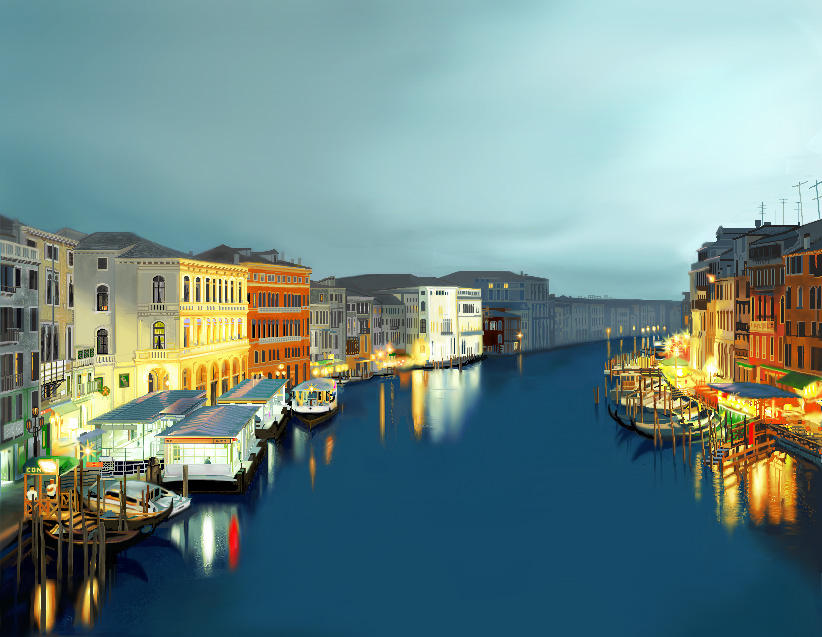
Here is an image drawn in MS Paint:
(It took him 500 hrs to draw it)

and the ultimate master at MS Paint:
Please Digg this if you liked it....
Enjoyed this post? Subscribe to Help For Linux RSS feed.
Well, it'd be fun to try it out just for the sake of it. MS Paint has virtually remained unchanged for the last 13 yrs since it was first released. Whenever people think of Microsoft they think about Ms Paint and all those ugly images they had drawn with it.
To run MS Paint do this:
1. Download paintnt.exe here
http://download.microsoft.com/downlo...us/paintnt.exe
2. Install Wine from Synaptic or from the terminal by typing
sudo apt-get install wine
3. Create a new folder and place the paintnt.exe file in it.
4. Run it with Wine, now all the required files will be extracted and you can use it as any normal program.
Here is a screenshot:
Here is an image drawn in MS Paint:
(It took him 500 hrs to draw it)

and the ultimate master at MS Paint:
Please Digg this if you liked it....
Subscribe to:
Posts (Atom)