Showing posts with label yahoo. Show all posts

Recover Your Lost IM Passwords

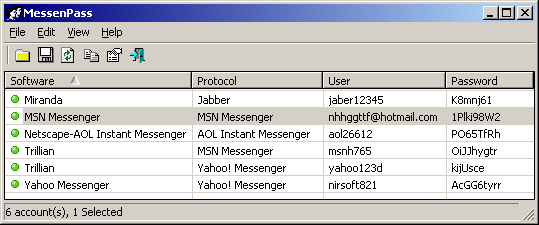
I am writing this post for those people who have lost their passwords and want to recover them. You can recover your password with a nifty tool MessenPass It is a password recovery tool that reveals the passwords of the following instant messenger applications:

  • MSN Messenger
  • Windows Messenger (In Windows XP)
  • Windows Live Messenger (In Windows XP And Vista)
  • Yahoo Messenger (Versions 5.x and 6.x)
  • Google Talk
  • ICQ Lite 4.x/5.x/2003
  • AOL Instant Messenger v4.6 or below, AIM 6.x, and AIM Pro.
  • Trillian
  • Trillian Astra
  • Miranda
  • GAIM/Pidgin
  • MySpace IM
  • PaltalkScene
  • Digsby


MessenPass can only be used to recover the passwords for the current logged-on user on your local computer, and it only works if you chose the remember your password in one of the above programs. You cannot use this utility for grabbing the passwords of other users. So all those GEEKS who were thinking that it is a Cracking tool I am sorry for broking your heart, but Hey! you can use it as don't you?


You can also use MessenPass
in Command Line mode without displaying any user interface.

Hope it would help you out, if you have any problem leave a comment.

Disclaimer: This information is provided by the author as it is from the application source. The author will not be liable for any special, incidental, consequential or indirect damages due to loss of data or any other reason.

Yahoo IM hosting a new worm, Be cautious!

Be cautious! An unexpected photo viewing invite on Yahoo Instant Messenger is the way of spreading worm. Since last two days people are receiving a downloadable link which seems as if their friends has sent message for sharing the images or photos but in reality it is a malware. This malware helps in installing a backdoor on Windows systems and spreads to a victim’s IM contacts.

If you at all receive a message with tags like ‘photo or ‘photos’ along with a smiley face icon, please avoid clicking on it. The malicious link seems quite similar to a photo viewing request from Facebook or MySpace.

By clicking on the link the yahoo users will get a downloadable file. Afterwards no action will take place but as the executable will downloaded already once user runs the file on windows system your PC will get infected and the malicious message will be distributed to all of the IM contacts.


Source: ub-news.com

Use Gmail with Keyboard Shortcuts

Gmail has got shortcuts in it like we have in yahoo. This feature often goes unnoticed because it is not enabled by default. ( I found it only last week ! So is my father ).

To enable shortcuts go to settings. In the general settings ( the very first page ) turn keyboard shortcuts on. Now save the settings. Back in the inbox you will find a ' > ' waiting before the last mail you read. This is the indication of which mail you are pointing to.

Here are the basic shortcuts :
While in the inbox or while reading a mail these will work. Remember while you are entering text shortcuts will be counted as text inputs.

c   - Compose
Shift + c   - Compose in a new window
j   - Older mail ( the arrow > moves down while you are in the inbox )
k   - Newer mail
enter or o   - Open mail
/   - To place the curser in the search box
u   - Back ( Like Back to Inbox or Back To Contacts )
r   - Reply
f   - Forward

gi ( g followed by i pressed in sequence )
   - Go to inbox
gd   - Go to drafts
gs   - Go to sent mail
gc   - Go to contacts

For the complete list of shortcuts see the learn more button just near the ' turn keyboard shortcut on ' option in gmail settings.

b

Feedblitz has some Unique Subscription Options

We had been using Feedblitz email delivery service even before Million Clues! was born went live. But it’s only recently that we noticed some unique subscription options available with Feedblitz, which are hard to be found elsewhere, including Feedburner. In addition to regular email, Feedblitz can send content updates to Twitter, Skype and Instant Messengers like AOL Messenger, Microsoft Messenger and Yahoo! Messenger (see image)

Subscription Options of Feedblitz Email Service Regardless the method of subscription, each one needs verification, so you can be assured against spammers. If email delivery is chosen, a confirmation link is sent to the email address provided for validating the user. Every other service has its own kind of verification to ensure that the user is the valid owner of the email address provided. For instance, when Yahoo! Messenger is chosen, the user is asked to add a friend with the name ‘FeedBlitz.Alerts’ and send a instant message with content ‘OK 124738’ to this friend.

So if you do not check your email regularly, then you can choose any one of these alternatives to subscribe to a blog. This is another reason to use Feedblitz Email Service rather than Feedburner Email.

You may also like to read:

How to Download the Full Installer of Yahoo! Messenger: Faster Download

Downloading Yahoo! Messenger is simple. Just head to yahoo.com/messenger. There you will find the newest Messenger waiting for a free download. What you get from there is an installer which weighs around 800kb. But the real messenger is heavier than that. A full installer is about 10mb. The 800kb installer downloads the remaining files during installation. The download is not as fast as the download using a download manager. This trick is for those who wish to download the full installer to their pc. This trick is useful if you have a slow internet connection or if you wish to download the whole messenger using a download manger.

What we do is that we find the location of the full installer.
1. Download the Yahoo! Messenger Installer from the messenger section of Yahoo. This file is not that big (usually around 800kb)
2. Go offline
3. Now run the installer when you are offline. There is a step where it downloads the remaining files. Since you are offline, an error says that it cannot connect to server. This error window contains the link to the alternate installer which is the full installer. Now connect to the internet and press yes. This will start the download of the full installer.

There is an alternate method which is worth a try. Usually the small installer is named msgrXus.exe where X is the version number. This name will be present in the download link of the small installer. Just add a ‘y’ to the name so that it reads ymsgrXus.exe. Now you can directly download the full installer.

Make Yahoo! Day Planner Widget Work with Google Calendar

[Updated Aug 3]

The Day Planner widget that comes with the Yahoo! Widget Engine (a.k.a. Konfabulator) can work with iCalendar (ICAL) files, but this feature has been hidden in the Windows platform since Mozilla Sunbird stopped using iCalendar files (.ics) for storing calendar data.


Google Calendar makes a private link to your calendars, in various formats, including ICAL. To use it with Yahoo! Day Planner widget (which looks a lot better than Google Desktop Gadgets, IMO), you have to do 2 things:
  1. Find a way to periodically download the GCal .ics file from the Internet to a file on your computer.
  2. Hack the widget to use the .ics file for calender info.
There are several ways (I presume) of handling step 1, but for step 2: quit Yahoo! Widget Engine and then go to the following key in the Registry and change the value with the name source to the string icalendar

HKEY_CURRENT_USER\Software\Yahoo\WidgetEngine\Widgets\Day Planner

Now, to periodically download the .ics file... You can get your private URL for the .ics file under Settings in Google Calendar (more info). I made an AutoHotkey script to download it periodically, but I imagine there are a lot of little utilities that can periodically download a file from the Internet. Whatever you set up, when you start Yahoo Widgets again, you'll be prompted for the directory where the .ics file you want to use is located.

Update: I modified the Day Planner widget to make it more friendly to iCalendar files. I used the Widget Converter widget to convert the Day Planner.widget to a folder. I then edited PIMp.kon in Wordpad.

Having Problems Connecting Yahoo Mail?

For months now, many of us have had problems connecting our Yahoo Email.  We've clicked our Yahoo Email shortcut in our favorite internet browser and then after practically and eternity, we finally see a blank white screen that reads, "Unable to Connect".  Then a few hours later, we can get in. And if that wasn't frustrating enough, some of our friends aren't having problems at all. 

Troubleshooting intermittent problems like these are challenging.  But last night I happen to be paying a little more attention and noticed one minor detail.  The shortcut I was clicking on pointed to a different location then the actual address where my email was stored.  In other words, it looks like Yahoo moved my email account to another server and my shortcut was still pointing to the old server.  

Since the old shortcut worked part of the time (but not all), I'm guessing Yahoo put a redirect in place so that when the old shortcuts were clicked, they would be redirected to the new servers ... but I'm guessing the redirect wasn't always working (which is why my problem was intermittent).

So next I deleted my old shortcut and used Google to get back to my Yahoo email and created a new shortcut.  So far that seems to have solved all of my Yahoo connection problems.

login in yahoo messenger with multiple Id at the same time

dear readers , I have written an article in triond about how to get logged in in yahoo messenger with many Id in the same time. the process easy. There are 2 ways to do so, you can either install patches or do it manually . I prefer the manual process because it's very easy . To know how to do it just click the link and read the process.

Click here to read the articles - Yahoo messenger multiple login  


The reason i am not posting the article here is because i have already written it in triond and if i re-write it here my article ranking will decrease 


Hope you will like it thank you for your visit :)