Facebook has its own email program so you can easily email your facebook friends. This is especially useful for those friends you might have an email address for. And like other email programs, you can attach photos to your messages. This is a great way to share profile pictures and other small images, but is not ideal for sending multiple images.
When a photo is sent via Facebook emaiil, it typically shows up in the message (as opposed to showing as an attachment). To save this photo to your computer, just RIGHT CLICK on it and select SAVE IMAGE AS.
Be sure to note where the image is being saved to before you click to save it. If in doubt, check your "Picture" folder, "Documents" folder or "Download folder. You can also check the desktop. These are the locations where most downloaded attachments are saved.
Showing posts sorted by date for query facebook. Sort by relevance Show all posts
Showing posts sorted by date for query facebook. Sort by relevance Show all posts
How to Earn Godfather Points in Mafia Wars
Many people will not be interested in this information ... but since a lot of my clients play Mafia Wars on Facebook (as well as other games), I get asked a lot of information about playing these games. And as usual, i like to share information here so everybody can benefit it from it.
Mafia Wars is one of the hottest games on Facebook (and MySpace). In short, you create a mobster character and play against other mobsters. The cool thing is that any of your friends who are playing the game can be added to your mafia family, which in turn helps to make you a stronger character. There is a lot of interaction with your friends on this game, which is really what makes it so much fun.
Godfather points (also called, "Reward Points"), is one of the bonuses you earn while playing the game. These points are then spent on various things including increasing the size of your mafia family and weapons. They can also be used to buy other things (like increased energy, stamina and health, to name a few).
Getting enough Godfather points to buy things takes time, but you can earn more by doing a few things (short of literally buying them with your credit card).
First, you earn 1 Godfather point every time you level up to an even level (2, 4, 6, 8, etc.). This is the slowest way to earn Godfather points, but is guaranteed.
Next, you can earn Godfather points by playing the "Daily Chance" lottery tickets. After you submit a ticket, you'll notice you've completed a level of the ticket mastery. There are 6 levels to this mastery. This means that to achieve the 6th level, you have to keep submitting tickets (one per day) without collecting the bonus after each submission. By doing so, you will eventually get all 6 levels completed (if you start collecting at the beginning of the Mafia War week), and only then do you want to collect the bonus - which will be anywhere from 1 to 5 Godfather points (the amount varies). This is one of the quickest ways to earn Godfather Reward Points.
Another way to earn Godfather points is through special loot drops. Every holiday and on special occasions, Mafia Wars offers special loot and jobs. Oftentimes, Godfather points are offered as a bonus reward. There is usually a limit of 10 reward points during any special loot offering, but you'd be surprise how much even this little bit helps!
The last way to earn Godfather points is through completing special offers (i.e., signing up for free trials of products) or buying them using a credit card. Unless you're one of those people with lots of disposable income, I do not recommend either of these last two options.
Needless to say, the first three methods are the best way of earning Godfather points in Mafia Wars.
Mafia Wars is one of the hottest games on Facebook (and MySpace). In short, you create a mobster character and play against other mobsters. The cool thing is that any of your friends who are playing the game can be added to your mafia family, which in turn helps to make you a stronger character. There is a lot of interaction with your friends on this game, which is really what makes it so much fun.
Godfather points (also called, "Reward Points"), is one of the bonuses you earn while playing the game. These points are then spent on various things including increasing the size of your mafia family and weapons. They can also be used to buy other things (like increased energy, stamina and health, to name a few).
Getting enough Godfather points to buy things takes time, but you can earn more by doing a few things (short of literally buying them with your credit card).
First, you earn 1 Godfather point every time you level up to an even level (2, 4, 6, 8, etc.). This is the slowest way to earn Godfather points, but is guaranteed.
Next, you can earn Godfather points by playing the "Daily Chance" lottery tickets. After you submit a ticket, you'll notice you've completed a level of the ticket mastery. There are 6 levels to this mastery. This means that to achieve the 6th level, you have to keep submitting tickets (one per day) without collecting the bonus after each submission. By doing so, you will eventually get all 6 levels completed (if you start collecting at the beginning of the Mafia War week), and only then do you want to collect the bonus - which will be anywhere from 1 to 5 Godfather points (the amount varies). This is one of the quickest ways to earn Godfather Reward Points.
Another way to earn Godfather points is through special loot drops. Every holiday and on special occasions, Mafia Wars offers special loot and jobs. Oftentimes, Godfather points are offered as a bonus reward. There is usually a limit of 10 reward points during any special loot offering, but you'd be surprise how much even this little bit helps!
The last way to earn Godfather points is through completing special offers (i.e., signing up for free trials of products) or buying them using a credit card. Unless you're one of those people with lots of disposable income, I do not recommend either of these last two options.
Needless to say, the first three methods are the best way of earning Godfather points in Mafia Wars.

Free ways to bring traffic to your blog

Every blogger loves constant traffic to their blogs and its really a hectic task .A lot of work is to be done so that the blog gets the needed publicity. There are two ways to achieve this PAID and FREE.People who don't have problem spending $$, use the PAID route,but bloggers like me who would first try to get decent traffic using all the free sources will constantly look for ways to do it.
The sole purpose for the article is to help new bloggers to get some descent traffic to their blogs without spending a single penny!
- Submit your blog to all search engines,use Submit Express
- Choose a short but sweet name for your blog.so that it would be easier for people to remember
- Use appropriate keywords,use Google keyword tool
- Create a Facebook community page
- Use twitter effectively, Re-tweet often
- Your blog should have an E-mail subscription form,its a cool way to get permanent members
- Add your blogs signature in your email
- Use pinging services like Pingomatic
- Join Mybloglog ,Blogcatalog ,create communities and add friends ( A female pic will attract visitors lol)
- Submit your blog to Technorati
- Display you blogs code in you home page show that others can link to you
- Submit feed to yahoo.and also create set up Google websmaster tools
- Submit your blog to Blog directories
- Answer questions on the forums from your niche and also leave a link to your blog if there is a solution
- Answer questions on yahoo answers
- Write articles to help new bloggers
- Publish a newsletter,make your the newsletter is short and attractive
- Leave an attractive comment on other blogs in your niche with your blog link below the comment
- Add alt text to images,in this way you will get traffic from image searches
- Add social bookmarking and sharing buttons in every post
- Be a Guest blogger on other blogs that allow to submit articles,or submit articles to Ezeinarticles
- Contact other bloggers in your niche and exchange links
- Use simple fonts and a professional looking template,easier to navigate
- Update the contents frequently
- Organize giveaways,everyone loves free gifts
- Add Top commentators list ,this will encourage people to comment frequently
- Submit articles to Digg,Delicious,Stumble upon,yahoo buzz,Google buzz,twitter, friend-feed, Reddit,etc
- Always ask your visitors to share the posts
- Setting up a live chat box is always beneficial use Yaplet
- Submit your blog to Review sites like Ratemysite com and coolsiteoftheday
- Using trackback link help
- Be patient :)

Download Facebook Photo Albums With FacePAD
A Facebook user like me loves to share photos and save it to the Hard drive. But saving an Entire album is a time consuming task.Facebook does not have this option to download an entire album.But now this can be easily done using Facepad .its a Firefox addon.
Download an entire album with a right click .All you have to do is right click on the album and select “Download Album with FacePAD”.


Features:
Download an entire album with a right click .All you have to do is right click on the album and select “Download Album with FacePAD”.


- Download facebook pictures on to your Hard drive.
- Backup Your Facebook Pictures
- Very Simple and easy to Install and use
- No registration yippee!!
Some pros :
Pros:
Download Entire albums quickly and easily
No Registration
Easy to install and use
Download : FacePad addon for Firefox
Note: I have only found a Firefox extension,works perfectly for Firefox
Note: I have only found a Firefox extension,works perfectly for Firefox
How to Stop Facebook from Sharing Info on Google
As of today, Facebook now allows "indexing" on their site. This means that Facebook can now share info about you to Google, which can then appear in their search engines. Needless to say, this is a BIG privacy issue!
The good news is that you can dis-allow indexing, and is definitely something you'll want to do (and make sure your kids to the same).
Here's how to stop Facebook from indexing your information:
That should do it. However, while you're looking around your settings, you might also like to check some of the other settings as well to make sure nothing is being shared that you don't want.
For more information about Facebook Privacy, click here.
The good news is that you can dis-allow indexing, and is definitely something you'll want to do (and make sure your kids to the same).
Here's how to stop Facebook from indexing your information:
- Log into your Facebook account.
- Go to your SETTINGS and select PRIVACY SETTINGS
- Then click the SEARCH link
- Uncheck the box that reads, "Allow Indexing".
That should do it. However, while you're looking around your settings, you might also like to check some of the other settings as well to make sure nothing is being shared that you don't want.
For more information about Facebook Privacy, click here.
Visit us on FaceBook:
http://www.facebook.com/#/pages/Lakeland-FL/My-Computer-Girl-Inc/64701784166?ref=ts
Become a fan!
Computer Networking Services of Lakeland FL
www.MyComputerGirl.com
http://www.facebook.com/#/pages/Lakeland-FL/My-Computer-Girl-Inc/64701784166?ref=ts
Become a fan!
Computer Networking Services of Lakeland FL
www.MyComputerGirl.com
FarmTown Hacks and Tools for Fast Plow, Harvest and Plant in one click for Free in Facebook

FarmTown hacks for free, try and Download one of the File Below to helps you to Plow, Seeds and Harvest in One Click.
Download QuickClickv1.0: Here
Download AutoClickv2.2: Here

Subscribe in a reader



How to Delete Posts on Facebook
Every time you do something on Facebook, your activity is logged on your profile page. For example, if you make changes to your profile settings, Facebooks shares this with the world on your profile page. If you comment on another person's status or photo, it gets logged on your profile page so folks know what you're up to.
This may or may not bother you, especially if you're using Facebook for personal reasons. But if you're a business owner, you might not want to share your "housekeeping" activity with others. Here's an example of the kind of activity posts I'm talking about.
 As you can see, these kind of posts really have no value and on a business page, can stick out a like a sore thumb. Deleting them is easy. Just follow the steps below:


You'll have to repeat these steps for every post you want to remove. But you'll notice that your facebook page looks a lot cleaner with these types of posts removed from it.
For information on removing game posts from Facebook, click here.
This may or may not bother you, especially if you're using Facebook for personal reasons. But if you're a business owner, you might not want to share your "housekeeping" activity with others. Here's an example of the kind of activity posts I'm talking about.
- Move your mouse to the top right corner of a post, and you will see an X appear (like the one circled in red below).
- Click the X and a window will pop-up asking if you want to remove the post.
Click REMOVE POST

You'll have to repeat these steps for every post you want to remove. But you'll notice that your facebook page looks a lot cleaner with these types of posts removed from it.
For information on removing game posts from Facebook, click here.
How to Remove "New Friends" Notices on Facebook
Facebook made some changes a couple of days ago to their news feed which has left folks seeing a lot of unwanted messages. One of these messages relates to folks accepting friend requests. The message looks like this:
"John Smith and Jane Doe are now friends".
If you don't want to see these messages, you can easily change this. To REMOVE the new friends notices from the news feed:
"John Smith and Jane Doe are now friends".
If you don't want to see these messages, you can easily change this. To REMOVE the new friends notices from the news feed:
- REST YOUR MOUSE (Don't Click) SETTINGS on the top right blue bar on your facebook page and then click on PRIVACY SETTINGS
- Then click the link that reads, NEWS FEED & WALL
- Uncheck 'Add a friend'.
10 Privacy Settings for Facebook You Should Know
I know I've posted information about privacy settings on Facebook before, but they can't be emphasized enough. While it's best to approach facebook from the standpoint that EVERYTHING is public, you do some control over what information is shared.
I stumbled across an article today titled, "10 Privacy Settings Every Facebook User Should Know". There are some excellent tips in this article and it's well worth your time to read.
For more information about Facebook Privacy, check out the links below. Of course, keep in mind that if you're a business owner on Facebook, you may not want to implement some of these privacy changes since they would reduce your visibility.
Facebook Places & Your Privacy
Changing Your Privacy Settings in Facebook
How to Stop Facebook From Sharing Info on Google
I stumbled across an article today titled, "10 Privacy Settings Every Facebook User Should Know". There are some excellent tips in this article and it's well worth your time to read.
For more information about Facebook Privacy, check out the links below. Of course, keep in mind that if you're a business owner on Facebook, you may not want to implement some of these privacy changes since they would reduce your visibility.
Facebook Places & Your Privacy
Changing Your Privacy Settings in Facebook
How to Stop Facebook From Sharing Info on Google
How to Hide Game Posts and People on Facebook
Once you start accumulating friends on Facebook, it's easy to get overwhelmed by some constant flood of posts (especially game posts). The good news is that you can chose to hide posts (and people) that you really don't want to see on Facebook.
While hiding game posts is easy, hiding people can be a sensitive issue. You might wonder why even have a person as friend if you don't want to see them or have any communication with them. That's a good a question! The answer is simple. Some of us have relatives or friends that we find offensive (or at least find their posts offensive) and while we don't want to see them, we don't want to delete them from our friends list because we don't want to hurt their feelings. This happens a lot. And whether you decide to delete somebody from your friend's list or chose to hide them instead, is totally up to you.
Game posts (and other posts, like horoscopes, questions, etc.) are another matter. Some of the games (especially Zynga games like Mafia Wars and Farmville) require folks to post a lot a messages in order to solicit friends help in the games. If you don't like to play games, seeing all these posts on your Facebook page can get annoying fast. Here's how to hide them ...
Find one of the game post (example below).

If you move your cursor to the top right side of this post, you'll see an "X" appear in the top right corner of that post. You won't see this "X" unless your cursor is hovering over the correct spot. .

Click that "X" and you'll see a group of buttons appear.

While you have 4 buttons (or choices on how to handle this post), I've only circled the two on the left. The first button gives you the choice to hide this person, while the second button lets you hide all game posts from this game.
The difference is this. Hiding the person means that you will never see another post from this person again (not even status posts) . Hiding the game post means that you will not see any posts relating to this game (Mafia Wars, in this example), but you will still see other posts this person makes.
When hiding game posts, you'll have to repeat the steps above to remove each game you're not interested in. So for example, you'll have to repeat the process to hide all game posts for Mafia Wars, Farmville, Farm Town, Cafe World, etc.
For more information on deleting facebook posts, click here.
While hiding game posts is easy, hiding people can be a sensitive issue. You might wonder why even have a person as friend if you don't want to see them or have any communication with them. That's a good a question! The answer is simple. Some of us have relatives or friends that we find offensive (or at least find their posts offensive) and while we don't want to see them, we don't want to delete them from our friends list because we don't want to hurt their feelings. This happens a lot. And whether you decide to delete somebody from your friend's list or chose to hide them instead, is totally up to you.
Game posts (and other posts, like horoscopes, questions, etc.) are another matter. Some of the games (especially Zynga games like Mafia Wars and Farmville) require folks to post a lot a messages in order to solicit friends help in the games. If you don't like to play games, seeing all these posts on your Facebook page can get annoying fast. Here's how to hide them ...
Find one of the game post (example below).

If you move your cursor to the top right side of this post, you'll see an "X" appear in the top right corner of that post. You won't see this "X" unless your cursor is hovering over the correct spot. .

Click that "X" and you'll see a group of buttons appear.

While you have 4 buttons (or choices on how to handle this post), I've only circled the two on the left. The first button gives you the choice to hide this person, while the second button lets you hide all game posts from this game.
The difference is this. Hiding the person means that you will never see another post from this person again (not even status posts) . Hiding the game post means that you will not see any posts relating to this game (Mafia Wars, in this example), but you will still see other posts this person makes.
When hiding game posts, you'll have to repeat the steps above to remove each game you're not interested in. So for example, you'll have to repeat the process to hide all game posts for Mafia Wars, Farmville, Farm Town, Cafe World, etc.
For more information on deleting facebook posts, click here.
Working Facebook Hack in Ninja Saga Alpha
Note: Use Mozilla Firefox or Google Chrome

Login your Account in Facebook then Open Ninja Saga Apps Here's the link
Go to your ninja saga profile which where you can find the status of your character.
Open Cheat engine 5.5 or latest version. if you don't have Cheat Engine installed in your Computer Click Here to download.
Now Open Cheat Engine and Select plugin-container.exe in your Process List.then click Open. See the image for better guide.
In your Cheat Engine Select Array of Bytes as Value type then copy the code below:
" a93f9a9999999999a93f " as your Hex Value. But before you Press the "FIRST SCAN" button. Make sure you checked "Also scan Read-Only Memory".
After the First Scan, One Address will Show. change the Hex Value or Double click The address and Change the value to:
" A9 3F 9A 99 99 99 99 99 F9 3F " for 1 Hit Critical
" A9 3F 9A 99 99 99 FF FF FF 3F " for 200% Crit. Rate
" F9 3F 9A 99 99 99 99 99 F9 3F " for all dodge
Exit your profile now and have some Fun.
==========================================================
First Open Cheat Engine 5.6 and Select plugin-container.exe in your Process List. Then Click Open. Choose "4 Bytes" as your Value Type and checked also "Also scan Read-Only Memory".
Put the Exact Value Of "GOLD"[Number] then Click First Scan. More Address Will Come up. in the left Pane of CE. Go to "SHOP" Sell some item to make your Gold increase. and put again the total Value Of "GOLD" and click "Next Scan"
Until 1 Address will remain.
Note: Make sure that the last 2 digit of 8 must be [78] or xXxXxX78 "02609F78" , "0F639C78". don't mind the first 6 digit the most important is the number "78" will come up. Change the Value OF "78" to "AC".
[AC] is the address of your char LEVEL.
For Example, The Address of "02609F78" will be "02609FAC" or "0F639C78" to "0F639CAC". Now Change The "Value" of xXxXxXAC address to 60 which mean LEVEL 60. tnx.
Tips: Pls. don't abuse this cheat, if you are in level 25. Change The "Value" of xXxXxXAC address to 26. and do level 25. Quest. to avoid connection error and disconnected.
==========================================================
Use Cheat Engine 5.6.1
Open Ninja Saga Alpha But Dont Click Play First.
Now Open Cheat Engine 5.6.1
Open The Name Process and Select plugin-container.exe
Change the Value Type to: " Array of Bytes "
Check " Also scan read-only memory "
Copy this CODE and PASTE
" 6204D32464A3A2 "
Then Click First Scan
2 Address Will show, double Click the 2 Address
And Change the Value to:
" 62 04 D3 24 64 A0 A2 "
Freeze the 2 Address and Start Play Ninja Saga.
Have Fun And Enjoy.. Hehehe..
==========================================================
Open Ninja Saga Alpha Apps
Go to Pet Shop
Open Cheat Engine 5.6.1
Select a process to open
Choose plugin-container.exe for Firefox user
In Cheat Engine Select Text As your Value Type
Then Type the Name of Pet you want to buy
Remember you must type the exact name of pet
you want to search as text.
Sample Pet's Name: Leiko
Leiko has a text[5] type.
It means that You must name your pet not greater
than 5 char string...
Now click First Scan
Double click all the result address in the left pane
Rename all the text Value
Any name you want, 5 char string only or less
Freeze the all address
close the shop to Refresh then Open Again
Find the Rename pet you want
then click buy..
==========================================================
To Use This Cheat You Must Have "Fiddler2" Installed in Your Computer
Fiddler2 is a Web Debugging Proxy Which Capture all Http's Log traffic
between your computer and the Internet. Note: System Required to Open Fiddler2
is Microsoft .NET Framework 2.0 or Latest
Open Ninja Saga Alpha then launch fiddler
Follow the Image Guide below...


Now Go to Kage Room, Click Grade C Mission
Choose Lv.2 Quest "Blacksmith's Request"
Your Quest is to Kill One "Training Dummy"
Finish This Quest twice...
| The error me occur You Need a Ninja Emblem If You want to have More than 20 consumables in your inventory, With a ninja Emblem, you will be able to have up to 40 consumables in your inventory |
Don't click "Get Now" just Turn Back
And Go to your Profile. In the lower right of your Firefox Browser
Click the "Fiddler:OFF(auto)" then click "Clear Firefox Cache"
Close your Fiddler. Refresh the Page Then Go Back to Shop and sell all your Weapons
to make your Gold More that half a billion. lols..
Tips: Gold Must Not higher than 9M So That GM will not banned you waheheheh... xD
and Always clear your browser cache before and after using Fiddler
Download mission_3.swf file: Here
Download Fiddler2 Beta Setup: Here
Download Microsoft Visual C++ Redistributable x86: Here
Download dotnetfix 2.0 : Here
==========================================================
Note: Use at Your Own Risk and Please Don't Abuse this Cheat Use Wisely...
if you are in a High Level its better to do not use this cheat "Sayang baka ma banned kayo". Tips: Create A New Char To Make it Safe...
Its Easy To use this Hack Simply, Download the [swf] File Name "academy.swf" Then drag and drop The File Inside Your Fiddler2 AutoResponder Tab. or Click This Sample Image Guide.. Here
Open and Play Ninja Saga and Go to your Academy..
Buy All the Skills You Want. ["Gold Only"]
Because You might Get error or disconnected.. If you buy a ["Token Skills"]
Remember 2 types of Element Skills Only
if you are not an Emblem user else
"alam mo na yan heheehe ..."
Download academy.swf File: Here
Tips: Always clear your browser cache before and after using Fiddler
Post update: "due to maintenance, This instant skill cheat is detected"
==========================================================
.:: Tired of Leveling in Ninja Saga Alpha ::.
Try this Cheat in a Hunting House 1 Hit KO From Lv.1 jump to Lv.20
Note: This Cheat is "Bannedable" :D
So be careful to use this cheat. Use this Once a day (Hunting hours) else your Detected. And Try other account before doing this cheat for sure to avoid your main to get banned. Remember use at your own risk.... this cheat is undetected.. So Pls. don't abuse this Cheat.. Level to use: Lv.1-19, Lv.21-39 Lv.41-Lv.59
Here's the steps
Open Ninja Saga Alpha and lunch Fiddler
Download "1KO2HuntSaga" file Extract the file And Drag All the SWF File on your Fiddler AutoResponder Tab
See the sample Image: Here

Now Enter "Hunting House" and Finish Them OFF
Download 1KO2HuntSaga: Here
==========================================================
Subscribe in a reader
Start An Online Business Without A Website
By: Mihai Dreve

Photo: treniatodayblog.com
So, you think that you would like to start your own business online? But, you don't know how to build a website and you don't have the cash to hire someone to do it for you. Therefore no website...no online business, right?
Wrong.
You still have options for building your own online business without a website.
The likely best option for your own online business, without a website is affiliate marketing. Affiliate marketing allows a new online marketer to sell online without having your own product to sell. To begin selling online you can register with an affiliate marketing program; these are operated by a merchant or retailer. You then choose the products that you would like to promote. As an affiliate you are paid a commission by the merchant after someone whom you have referred, has purchased an item from the merchant.
It is typically quite simple to become an affiliate and it is usually free. Despite this, people are often wary to become an affiliate marketer. People are often hesitant because they have no web site or marketing skills.
It is a common thought that affiliate marketing can be done without a website. An individual can begin promoting affiliate products without a website and there are many ways this can be done. Many affiliate marketing strategies can lead to success without a website. These strategies are email marketing offline promoting, ebook and article publishing, ezine publishing, blogging and social marketing.
Offline Marketing
Affiliate products can be marketed by means that were once considered "traditional" marketing methods. These methods include classified ads, brochures, and flyers. Classified ads may be more appealing because they have a wider range of an audience.
Create Your Own Ebook
If you are a writer or aspire to be one, creating and writing your own ebook would be an excellent way for you to promote affiliate products without a website. Your best bet with an ebook would be for the tone to not be overly promotional, use your ebook to inform on a topic. However, be sure to draw a connection between the topic of your ebook and the affiliate product that you are promoting. You also have the flexibility to add text or banner ads to the end of your ebook and then link to the affiliate product merchant's website.
Ezines
Ezines are digital magazines or newsletters that focus on a particular subject. You can use ezines to promote or link to an affiliate product. If you do have a website, your ezine articles could also be content for your website. Without a website you can submit your ezine articles to sites that host ezines like goarticles.com, ezinearticles.com, and others. You can find more ezine sites through a simple search on a search engine.
Discussion Groups and Social Marketing Venues
Online discussion groups are great for promoting affiliate products, without or without a website. Chat rooms, message boards, forums or social sites, like myspace.com or facebook.com can have topic areas or groups that relate to your products. On these sites you can find people who may be interested in the products that you are promoting.
As you can see, one does not really need a website to start marketing affiliate programs. However becoming truly successful in affiliate marketing without a website is more difficult. Having a website isn't required for entering most affiliate programs. It is recommended that you at least plan to have your own website in the future. A website creates many advantages with your marketing affiliate programs. It can provide you with a place to do your own promotion of a variety of affiliate products. It also provides you with a place to market your own products.
To get started in affiliate marketing you certainly do not need your own website. You can learn the basics of marketing affiliate products with out a site. Down the road with some marketing experience under your belt, a website will increase your affiliate marketing opportunities.
Mihai Dreve - Enthusiastic online marketing specialist, trying to constantly add rich web content, discover brand new marketing techniques, find more and more niche keywords and help create successful online businesses. A very good place to start is here: http://www.cbmall.com/to/easyonlinebusiness
Article Source:
http://www.articlebiz.com/article/1051335066-1-start-an-online-business-without-a-website/

Photo: treniatodayblog.com
So, you think that you would like to start your own business online? But, you don't know how to build a website and you don't have the cash to hire someone to do it for you. Therefore no website...no online business, right?
Wrong.
You still have options for building your own online business without a website.
The likely best option for your own online business, without a website is affiliate marketing. Affiliate marketing allows a new online marketer to sell online without having your own product to sell. To begin selling online you can register with an affiliate marketing program; these are operated by a merchant or retailer. You then choose the products that you would like to promote. As an affiliate you are paid a commission by the merchant after someone whom you have referred, has purchased an item from the merchant.
It is typically quite simple to become an affiliate and it is usually free. Despite this, people are often wary to become an affiliate marketer. People are often hesitant because they have no web site or marketing skills.
It is a common thought that affiliate marketing can be done without a website. An individual can begin promoting affiliate products without a website and there are many ways this can be done. Many affiliate marketing strategies can lead to success without a website. These strategies are email marketing offline promoting, ebook and article publishing, ezine publishing, blogging and social marketing.
Offline Marketing
Affiliate products can be marketed by means that were once considered "traditional" marketing methods. These methods include classified ads, brochures, and flyers. Classified ads may be more appealing because they have a wider range of an audience.
Create Your Own Ebook
If you are a writer or aspire to be one, creating and writing your own ebook would be an excellent way for you to promote affiliate products without a website. Your best bet with an ebook would be for the tone to not be overly promotional, use your ebook to inform on a topic. However, be sure to draw a connection between the topic of your ebook and the affiliate product that you are promoting. You also have the flexibility to add text or banner ads to the end of your ebook and then link to the affiliate product merchant's website.
Ezines
Ezines are digital magazines or newsletters that focus on a particular subject. You can use ezines to promote or link to an affiliate product. If you do have a website, your ezine articles could also be content for your website. Without a website you can submit your ezine articles to sites that host ezines like goarticles.com, ezinearticles.com, and others. You can find more ezine sites through a simple search on a search engine.
Discussion Groups and Social Marketing Venues
Online discussion groups are great for promoting affiliate products, without or without a website. Chat rooms, message boards, forums or social sites, like myspace.com or facebook.com can have topic areas or groups that relate to your products. On these sites you can find people who may be interested in the products that you are promoting.
As you can see, one does not really need a website to start marketing affiliate programs. However becoming truly successful in affiliate marketing without a website is more difficult. Having a website isn't required for entering most affiliate programs. It is recommended that you at least plan to have your own website in the future. A website creates many advantages with your marketing affiliate programs. It can provide you with a place to do your own promotion of a variety of affiliate products. It also provides you with a place to market your own products.
To get started in affiliate marketing you certainly do not need your own website. You can learn the basics of marketing affiliate products with out a site. Down the road with some marketing experience under your belt, a website will increase your affiliate marketing opportunities.
Mihai Dreve - Enthusiastic online marketing specialist, trying to constantly add rich web content, discover brand new marketing techniques, find more and more niche keywords and help create successful online businesses. A very good place to start is here: http://www.cbmall.com/to/easyonlinebusiness
Article Source:
http://www.articlebiz.com/article/1051335066-1-start-an-online-business-without-a-website/
Restaurant City Hack in Facebook
 Hi Guys I Have a hack that make your char in Restaurant City to Auto registration of employee stamina, Fast one second cooking, Fast waiter serving food and drink, Fast Running Customer and No Customer wants to get Toilet. All you need to do is Download the Hack then open your account in FACEBOOK and Play Restaurant City. After the loading is complete click patch or drag the hack in your Restaurant City Browser and click PATCH. Happy Hacking.
Download RestaurantCityHack[FaceBook]: Here
New Update Download Reshack v1.12 with Fast eating Customers
Download ResHackv1.12: Here
Note: The Rar File Pack with Password,and My Password is facebookhack
Subscribe in a reader
How to rank number one in the search engines for free
By: David Anthony Watson

Photo: smartmediapro.com
It is relatively straightforward to rank in the search engines for your name quite quickly if you follow some of the steps detailed below. These are the free steps that I performed to rank number 1 in less than a week, however there will be many more ideas. So the next time you think about paying for this service, perhaps re-think this idea.
1. Create profiles on social networking sites
There are literally hundreds of social networking sites to join and add a profile. Amongst the most well known are Facebook, Twitter and MySpace. I would recommend starting with these sites and make sure you add in plenty of details about you as well as your contact details and website address.
2. Join internet forums
Again there are literally hundreds of online forums that you can join on the internet, these can rank well in the search engines particularly for your name. Join a number of forums and start talking to people worldwide about your niche or expertise.
3. Article Marketing
If you are reading this article you probably understand the importance of article marketing when marketing your brand online. Giving your readers quality content is likely to ensure they come back for more. Join a number of article sites and start submitting quality content for niche. Write a strong bio on yourself including your areas of expertise.
4. Video Marketing
Video marketing is a great way to connect with your audience as it gives them a much more personalized message. You can join You Tube for free and start making videos with a basic webcam. Popular videos can rank very quickly in the search engines so try and make it entertaining and of value. Record a video about yourself and use your name as the title in order to rank in the search engines.
5. Use your name as a keyword
For all the marketing mediums above, ensure you tag your name as a keyword, this will ensure that when someone types your name into the search engine, you are going to be optimized for it. If you have a highly popular name, like mine, use your middle name or a nickname instead.
If you follow the steps above you will be well on your way to ranking in the search engines relatively quickly. Check out David Anthony Watson in one of the search engines and you will find me there in number one position.
http://www.living-entrepreneur.com?t=articles
David Watson is an Internet Marketing Lifestyle Coach with 13 years professional experience. He runs his own successful home based business online following a proven business formula.
To find out how you could be earning money with your own business or increase your sales online click here:
http://www.living-entrepreneur.com?t=articles
Article Source: http://www.ArticleBiz.com

Photo: smartmediapro.com
It is relatively straightforward to rank in the search engines for your name quite quickly if you follow some of the steps detailed below. These are the free steps that I performed to rank number 1 in less than a week, however there will be many more ideas. So the next time you think about paying for this service, perhaps re-think this idea.
1. Create profiles on social networking sites
There are literally hundreds of social networking sites to join and add a profile. Amongst the most well known are Facebook, Twitter and MySpace. I would recommend starting with these sites and make sure you add in plenty of details about you as well as your contact details and website address.
2. Join internet forums
Again there are literally hundreds of online forums that you can join on the internet, these can rank well in the search engines particularly for your name. Join a number of forums and start talking to people worldwide about your niche or expertise.
3. Article Marketing
If you are reading this article you probably understand the importance of article marketing when marketing your brand online. Giving your readers quality content is likely to ensure they come back for more. Join a number of article sites and start submitting quality content for niche. Write a strong bio on yourself including your areas of expertise.
4. Video Marketing
Video marketing is a great way to connect with your audience as it gives them a much more personalized message. You can join You Tube for free and start making videos with a basic webcam. Popular videos can rank very quickly in the search engines so try and make it entertaining and of value. Record a video about yourself and use your name as the title in order to rank in the search engines.
5. Use your name as a keyword
For all the marketing mediums above, ensure you tag your name as a keyword, this will ensure that when someone types your name into the search engine, you are going to be optimized for it. If you have a highly popular name, like mine, use your middle name or a nickname instead.
If you follow the steps above you will be well on your way to ranking in the search engines relatively quickly. Check out David Anthony Watson in one of the search engines and you will find me there in number one position.
http://www.living-entrepreneur.com?t=articles
David Watson is an Internet Marketing Lifestyle Coach with 13 years professional experience. He runs his own successful home based business online following a proven business formula.
To find out how you could be earning money with your own business or increase your sales online click here:
http://www.living-entrepreneur.com?t=articles
Article Source: http://www.ArticleBiz.com
How to Hide Mafia Wars & Other Game Messages in Facebook
If you have a lot of friends on Facebook, chances are some of them are playing the farm games (Farm Town and Farmville) or Mafia Wars. These are some of the most popular games on Facebook.
But if you're not playing these games, it can get annoying to look at all the messages these games post as players advance in levels and complete other tasks.
So what do you do when you really don't want to look at these messages but still see status messages from your friends? Simple ... Just hide the messages from these games.
Find a farming or Mafia Wars post (or any other game) on your Facebook page. On the right of it, you'll see the word, "Hide" and if you click it, you'll have to option to hide all messages from that person or just hide the game messages.
That's all there is too it. Hiding farming and Mafia Wars messages can make Facebook more enjoyable for those who don't want to play those games.
But if you're not playing these games, it can get annoying to look at all the messages these games post as players advance in levels and complete other tasks.
So what do you do when you really don't want to look at these messages but still see status messages from your friends? Simple ... Just hide the messages from these games.
Find a farming or Mafia Wars post (or any other game) on your Facebook page. On the right of it, you'll see the word, "Hide" and if you click it, you'll have to option to hide all messages from that person or just hide the game messages.
That's all there is too it. Hiding farming and Mafia Wars messages can make Facebook more enjoyable for those who don't want to play those games.
How to Delete a Friend's List in Facebook
Facebook let's you separate your friends into categories. There are many different reasons why folks might want to do this. But sometimes, you may also want to delete one of the lists you've created. And doing so can be a tricky if you're new to Facebook, so I thought I'd share the secret with you.
A couple of days ago, I created a friends list called, "Mafia Friends" and added all of my friends to it that were playing Mafia Wars. My hope was that I could use this list to publish the many Mafia achievement notices too (that way others won't have to look at them). Sadly, Mafia Wars didn't give me the option to publish those posts to a specific friends list ... so I decided to delete it.
If you have a similar friends list you'd like to delete, here are the steps to do so.

Note that when you delete a friends list, the friends that were in this list are still your friends, they just don't belong to this list anymore.
Naturally the Faecebook programmers decided they needed to change the layout once again on Facebook so these "how to" instructions are not completely accurate anymore - but the concept is the same. You can still create and delete special friends lists in the new Facebook. But now, you'll want to follow the instructions below:
A couple of days ago, I created a friends list called, "Mafia Friends" and added all of my friends to it that were playing Mafia Wars. My hope was that I could use this list to publish the many Mafia achievement notices too (that way others won't have to look at them). Sadly, Mafia Wars didn't give me the option to publish those posts to a specific friends list ... so I decided to delete it.
If you have a similar friends list you'd like to delete, here are the steps to do so.
- At the top of your Facebook page, you'll see a blue toolbar. Click "Friends" on it.
- When you get to the Friends page, on the left side of the screen look under the heading, "Lists" for the list you've created (and want to delete).

In my case, the list I want to delete, is called, "Mafia Friends"
Click on the list you want to delete.
- At the top of the next screen (above your friends), you'll see a gray button that reads, "Delete List". Click on it to delete the list.
Note that when you delete a friends list, the friends that were in this list are still your friends, they just don't belong to this list anymore.
UPDATE: Feb, 17, 2010:
Naturally the Faecebook programmers decided they needed to change the layout once again on Facebook so these "how to" instructions are not completely accurate anymore - but the concept is the same. You can still create and delete special friends lists in the new Facebook. But now, you'll want to follow the instructions below:
- Click ACCOUNT and then EDIT FRIENDS (top right corner of Facebook screen)
- Under "Lists" in the left navigation, click FRIENDS
- The DELETE LIST button is now above your friends.
What is Facebook?
Facebook is a social networking website. It's a place for folks to gather and chat with each other, play games, and stay informed on news and other stories. Facebook is a competitor of MySpace (one of the first social networking sites created).
Signing up for an account is fast, easy and free. Anybody can join, although it's generally recommended that kids under 13 don't. But having said that, there are plenty of kids under 13 that are on Facebook. If you'd like to sign up for a Facebook account go to www.Facebook.com.
Once you have an account setup, the next step is to find family and friends and add them to your "friends list". This step is necessary if you want to communicate or see what your friends are up to on Facebook. The idea behind this step is to offer some basic privacy. This way only people you list as "friends" can see you stuff on Facebook.
To find friends on Facebook, type their name in the search box. Finding friends on Facebook can be a bit tricky because often times there's several people with the same name. So figuring out which person is the one you really want takes some extra steps sometimes. It's helpful if that person uploaded a photo of themselves (called a "profile photo"). This is the first step to identifying people on Facebook. If there isn't a photo, or there's still some doubt to the person identity, then you can click the "View Friends" link next to the person your interested in. The advantage of this is to see if you know the same people they do, and if you do, chances are this is the person you're looking for.
Adding friends on Facebook is a two-step process. First you have to "add them as your friend" (which in turn sends a message to that person that you want to be friends) ... and they then have to "accept you" as their friend. If they don't accept you (or chose to ignore your request), you won't be ablee to see their Facebook stuff (posts, photos, etc.).
Once you've added friends to facebook (and they've accepted you as their friend), you can view their "friends list" - which can help you find more friends. Some of your friends may suggest more friends for you which you'll see on your home page of Facebook. It doesn't take long to add a bunch of friends on Facebook.
The next step is the social networking part. Anytime your friends write or post something on their wall (i.e., their home page), you will see it. This works in reverse too. Anytime you write or post something on your own wall (or homepage), your friends will see it. So far so good - just you and your friends are seeing each other stuff. However, this is where the privacy thing first starts to get out of control. If you comment on a friends post, not only will they see it, but so will their friends (who many not be on your friends list). Even though people you don't know will see your comments, they still won't have access to your Facebook stuff if they are not on your friends list.
But the basic rule on Facebook is this ... don't write, comment or share anything that you don't want the rest of the world seeing! Although there is some basic privacy on Facebook, you have to conduct yourself as if there is none.
We'll talk more about privacy and danger issues related to Facebook later, but for now, I hope you have a better understanding of what Facebook is and how to get started using it.
Signing up for an account is fast, easy and free. Anybody can join, although it's generally recommended that kids under 13 don't. But having said that, there are plenty of kids under 13 that are on Facebook. If you'd like to sign up for a Facebook account go to www.Facebook.com.
Once you have an account setup, the next step is to find family and friends and add them to your "friends list". This step is necessary if you want to communicate or see what your friends are up to on Facebook. The idea behind this step is to offer some basic privacy. This way only people you list as "friends" can see you stuff on Facebook.
To find friends on Facebook, type their name in the search box. Finding friends on Facebook can be a bit tricky because often times there's several people with the same name. So figuring out which person is the one you really want takes some extra steps sometimes. It's helpful if that person uploaded a photo of themselves (called a "profile photo"). This is the first step to identifying people on Facebook. If there isn't a photo, or there's still some doubt to the person identity, then you can click the "View Friends" link next to the person your interested in. The advantage of this is to see if you know the same people they do, and if you do, chances are this is the person you're looking for.
Adding friends on Facebook is a two-step process. First you have to "add them as your friend" (which in turn sends a message to that person that you want to be friends) ... and they then have to "accept you" as their friend. If they don't accept you (or chose to ignore your request), you won't be ablee to see their Facebook stuff (posts, photos, etc.).
Once you've added friends to facebook (and they've accepted you as their friend), you can view their "friends list" - which can help you find more friends. Some of your friends may suggest more friends for you which you'll see on your home page of Facebook. It doesn't take long to add a bunch of friends on Facebook.
The next step is the social networking part. Anytime your friends write or post something on their wall (i.e., their home page), you will see it. This works in reverse too. Anytime you write or post something on your own wall (or homepage), your friends will see it. So far so good - just you and your friends are seeing each other stuff. However, this is where the privacy thing first starts to get out of control. If you comment on a friends post, not only will they see it, but so will their friends (who many not be on your friends list). Even though people you don't know will see your comments, they still won't have access to your Facebook stuff if they are not on your friends list.
But the basic rule on Facebook is this ... don't write, comment or share anything that you don't want the rest of the world seeing! Although there is some basic privacy on Facebook, you have to conduct yourself as if there is none.
We'll talk more about privacy and danger issues related to Facebook later, but for now, I hope you have a better understanding of what Facebook is and how to get started using it.
Understanding Facebook
When Facebook first launched, I signed up for an account under the advice I was getting from a business mentor at the time. Social networking sites (like Facebook) are good business tools for various reasons. But after signing up for the account, I hardly ever touched it. Social networking was not my thing (and in many ways, still isn't).
Then one day, a friend told me about a game on Facebook and I decided to check it out because it was different ... and next thing I know, I'm really liking this game. And while I was quickly becoming addicted to this game, I noticed that a lot more of my old friends I hadn't seen in a while were on Facebook and we started reconnecting. Next thing I know, I'm hooked on Facebook and found myself visiting it everyday.
Yesterday I helped a 90-year old grandpa get started on Facebook so that he could surprise his grandkids. How cool is that? This gentleman had heard that his grandkids were on Facebook (often abbreviated, FB) ... he wanted to surprise them by showing up there himself. And what a surprise it was. Within minutes of setting up the account, he had made friends with his grandkids and was the talk of the town (so to speak). His grandkids spent the rest of the day bragging how proud they were of their grandpa being on Facebook and finding them!
I get a lot of questions from clients about Facebook, MySpace, Twitter, etc.
These are all social networking sites (and there are many more), where folks can congregate on the internet to chat, play games, read news and other interesting stories, etc. Many of the questions I get deal with the dangers of using such sites and the folks asking are concerned about their kids and grandkids. Naturally they want to protect them from internet dangers and so want to know more about how these sites work and what kind of dangers exist with them.
While the games and friends played a role in my getting more involved in Facebook, one of the primary reasons was so I could better answer these questions. Those who really know me, know that I'm not comfortable disclosing information about myself and prefer to stay under the radar. With Facebook, this is nearly impossible. But in an effort to better serve my clients, I decided to put myself out on that limb in order to better understand the flow of information on Facebook.
So I will be posting several different articles on this blog about Facebook. I hope that these articles will help answer all of your questions from "getting started" to "knowing the dangers". Anytime you want to know something about Facebook, you can type "Facebook" in the search box above the posts and click the "Search this blog" button. Every post I've written about Facebook will show up on the page.
So let's begin by talking about what Facebook is. Click here to learn more.
Then one day, a friend told me about a game on Facebook and I decided to check it out because it was different ... and next thing I know, I'm really liking this game. And while I was quickly becoming addicted to this game, I noticed that a lot more of my old friends I hadn't seen in a while were on Facebook and we started reconnecting. Next thing I know, I'm hooked on Facebook and found myself visiting it everyday.
Yesterday I helped a 90-year old grandpa get started on Facebook so that he could surprise his grandkids. How cool is that? This gentleman had heard that his grandkids were on Facebook (often abbreviated, FB) ... he wanted to surprise them by showing up there himself. And what a surprise it was. Within minutes of setting up the account, he had made friends with his grandkids and was the talk of the town (so to speak). His grandkids spent the rest of the day bragging how proud they were of their grandpa being on Facebook and finding them!
I get a lot of questions from clients about Facebook, MySpace, Twitter, etc.
These are all social networking sites (and there are many more), where folks can congregate on the internet to chat, play games, read news and other interesting stories, etc. Many of the questions I get deal with the dangers of using such sites and the folks asking are concerned about their kids and grandkids. Naturally they want to protect them from internet dangers and so want to know more about how these sites work and what kind of dangers exist with them.
While the games and friends played a role in my getting more involved in Facebook, one of the primary reasons was so I could better answer these questions. Those who really know me, know that I'm not comfortable disclosing information about myself and prefer to stay under the radar. With Facebook, this is nearly impossible. But in an effort to better serve my clients, I decided to put myself out on that limb in order to better understand the flow of information on Facebook.
So I will be posting several different articles on this blog about Facebook. I hope that these articles will help answer all of your questions from "getting started" to "knowing the dangers". Anytime you want to know something about Facebook, you can type "Facebook" in the search box above the posts and click the "Search this blog" button. Every post I've written about Facebook will show up on the page.
So let's begin by talking about what Facebook is. Click here to learn more.
Facebook Places & Your Privacy
The last couple of days there has been a post making the rounds on Facebook that reads ....
There seems to be some confusion about what Facebook Places are, and the steps given to change your "Places" settings in the message above are not accurate. So I thought I'd try and help explain it a bit better here.
To better explain Facebook Places, think about some of your friend's posts you may have seen on Facebook for a minute. I have a friend who uses Facebook Places and another similar application called, Loopt. Whenever this friend (we'll call him, John) goes anywhere, he uses his cell phone to post a message on Facebook telling his friends where he is. The post does show a map and address of the business name he is at.
This is what Facebook Places does. The idea is that if you're out at the mall, or movies, etc., you can share that information with your friends on Facebook ... so that if any of them just happen to be at the same place you are, then you guys can meet up. The original concept behind Facebook Places is harmless.
Below is a typical post that shows up on Facebook. John uses Facebook Places to share that he's at Starbucks getting coffee.

However, like anything else on Facebook, there are potential drawbacks and dangers folks should be aware of. Keep in mind that NOTHING on facebook is really private. And depending on your privacy settings, you may be sharing information about your whereabouts with more people than you think.
Some of my friends, for example, accept strangers as friends for game purposes. The more friends you have on Facebook playing certain games, the better the game experience. If your privacy settings are set for "friends only", keep in mind that even these strangers are seeing your whereabouts on Facebook Places. And if you think back to grade-school and "stranger, danger" for a moment ... you might want to keep in mind that strangers are unknown variables. In other words, if they're strangers, we don't really know if any of them are predators or sexual molesters, etc.
While adults may be willing to take the risk having their whereabouts tracked, I'd urge caution for your kids. It's not a good idea to let your kids broadcast their whereabouts on Facebook just in case that information is inadvertently falling into the wrong hands.
Now that you understand what Facebook Places are, and what dangers to watch for ... let's change the settings.
Notification Settings for Facebook Places
First, Facebook Places is an application, which means you don't have to use it. If you don't use it, Facebook won't post where you are (with the exception of tagging).
Secondly, the instructions in the warning message above are wrong. "Notifications" are emails sent by Facebook to you. Facebook lets you specify which emails you would like to receive from them. By default, you get an email for everything on Facebook (you may have noticed that your inbox is constantly flooded by emails from Facebook). Changing your "notification" settings will stop Facebook from emailing you for every little thing.
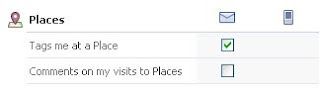
The Facebook Places Notifications, have two settings that you can change. The first setting mentions "tagging". If one of your friends is at Starbucks (for example), and you happen to be with them ... your friend might use Facebook Places to tell their friends that YOU are there with them (this is tagging). Although you and your friend might not have arrived together at Startbucks, but ran into each other there by accident ...and your friend tells facebook you're there using Facebook Places ... you've been tagged.
So it's not bad enough that your whereabouts can be inadvertently advertised to the world, but as you can see, your friends can also advertise your whereabouts without your knowledge through a process called, tagging).
The second notification just means that Facebook will email or text you if somebody comments on a Facebook Places post that you've been tagged in.
So in other words, if you see a checkmark under the email icon or phone icon, Facebook will email or text you anytime somebody tags you in a Facebook Places post or comments on that post. Unchecking these boxes means that you will not receive these emails or text messages .... which in turn means that you might never know if you've been tagged on Facebook Places (not good). It's better to leave these boxes checked so that at least you will know sooner than later if somebody is tagging you in Facebook Places.
There are a couple of other settings you can change to better protect your privacy with regards to Facebook Places. If you click ACCOUNT and then PRIVACY SETTINGS, you'll see Facebook Places in the list of settings.

If you click the "Customize Links" (bottom circle on image above), you'll be able to change the privacy settings for Facebook Places. This setting allows you to basically decide who will know when you check in using Facebook Places (or your friends do it for you). I've changed my setting so that only I will know.

This basically means that nobody but me will ever see that I've checked somewhere using Facebook Places. Notice, I've also unchecked the box below the "Places I check into" setting. While I'm not a 100% sure, I also think this means that even if I'm tagged in Facebook Places, nobody else will see that either.
For more information about Facebook Places, click here.
For more information about Facebook Privacy, click here.
NOTICE!!! Facebook Launched Facebook Places yesterday. Anyone can find out where you are when you are logged in. It gives the actual address and map location of where you are as you use Facebook. Make sure your kids know. TO UNDO:go to"Account", "Account Settings."Notifications" then scroll ...down ......to "Places..." and uncheck the 2 boxes. Make sure to SAVE changes and re-post this for others info.
There seems to be some confusion about what Facebook Places are, and the steps given to change your "Places" settings in the message above are not accurate. So I thought I'd try and help explain it a bit better here.
To better explain Facebook Places, think about some of your friend's posts you may have seen on Facebook for a minute. I have a friend who uses Facebook Places and another similar application called, Loopt. Whenever this friend (we'll call him, John) goes anywhere, he uses his cell phone to post a message on Facebook telling his friends where he is. The post does show a map and address of the business name he is at.
This is what Facebook Places does. The idea is that if you're out at the mall, or movies, etc., you can share that information with your friends on Facebook ... so that if any of them just happen to be at the same place you are, then you guys can meet up. The original concept behind Facebook Places is harmless.
Below is a typical post that shows up on Facebook. John uses Facebook Places to share that he's at Starbucks getting coffee.

However, like anything else on Facebook, there are potential drawbacks and dangers folks should be aware of. Keep in mind that NOTHING on facebook is really private. And depending on your privacy settings, you may be sharing information about your whereabouts with more people than you think.
Some of my friends, for example, accept strangers as friends for game purposes. The more friends you have on Facebook playing certain games, the better the game experience. If your privacy settings are set for "friends only", keep in mind that even these strangers are seeing your whereabouts on Facebook Places. And if you think back to grade-school and "stranger, danger" for a moment ... you might want to keep in mind that strangers are unknown variables. In other words, if they're strangers, we don't really know if any of them are predators or sexual molesters, etc.
While adults may be willing to take the risk having their whereabouts tracked, I'd urge caution for your kids. It's not a good idea to let your kids broadcast their whereabouts on Facebook just in case that information is inadvertently falling into the wrong hands.
Now that you understand what Facebook Places are, and what dangers to watch for ... let's change the settings.
Notification Settings for Facebook Places
First, Facebook Places is an application, which means you don't have to use it. If you don't use it, Facebook won't post where you are (with the exception of tagging).
Secondly, the instructions in the warning message above are wrong. "Notifications" are emails sent by Facebook to you. Facebook lets you specify which emails you would like to receive from them. By default, you get an email for everything on Facebook (you may have noticed that your inbox is constantly flooded by emails from Facebook). Changing your "notification" settings will stop Facebook from emailing you for every little thing.

The Facebook Places Notifications, have two settings that you can change. The first setting mentions "tagging". If one of your friends is at Starbucks (for example), and you happen to be with them ... your friend might use Facebook Places to tell their friends that YOU are there with them (this is tagging). Although you and your friend might not have arrived together at Startbucks, but ran into each other there by accident ...and your friend tells facebook you're there using Facebook Places ... you've been tagged.
So it's not bad enough that your whereabouts can be inadvertently advertised to the world, but as you can see, your friends can also advertise your whereabouts without your knowledge through a process called, tagging).
The second notification just means that Facebook will email or text you if somebody comments on a Facebook Places post that you've been tagged in.
So in other words, if you see a checkmark under the email icon or phone icon, Facebook will email or text you anytime somebody tags you in a Facebook Places post or comments on that post. Unchecking these boxes means that you will not receive these emails or text messages .... which in turn means that you might never know if you've been tagged on Facebook Places (not good). It's better to leave these boxes checked so that at least you will know sooner than later if somebody is tagging you in Facebook Places.
Privacy Settings for Facebook Places
There are a couple of other settings you can change to better protect your privacy with regards to Facebook Places. If you click ACCOUNT and then PRIVACY SETTINGS, you'll see Facebook Places in the list of settings.

If you click the "Customize Links" (bottom circle on image above), you'll be able to change the privacy settings for Facebook Places. This setting allows you to basically decide who will know when you check in using Facebook Places (or your friends do it for you). I've changed my setting so that only I will know.

This basically means that nobody but me will ever see that I've checked somewhere using Facebook Places. Notice, I've also unchecked the box below the "Places I check into" setting. While I'm not a 100% sure, I also think this means that even if I'm tagged in Facebook Places, nobody else will see that either.
For more information about Facebook Places, click here.
For more information about Facebook Privacy, click here.
Subscribe to:
Posts (Atom)